


Table of Contents
According to Onramp Funds, 14% of seller accounts faced suspensions in Q1 2025, up from 11% in 2024, driven by high order defect rates, IP complaints, counterfeit goods, and review manipulation violations.
In 2026, that same enforcement logic is hitting video assets harder because old creative carries old claims, old packaging, old language, and old assumptions about what Amazon will ignore.
Your Amazon video listing strategy now sits inside risk management, not just conversion rate optimization. A video can help sell the product, but it can also trigger asset rejection, suppress momentum on a high-volume ASIN, or create a wider account review if the same violations appear across the catalog.
Brands that loaded videos in 2021 through 2023 are exposed because content that passed then is now easy for Amazon’s AI systems to parse and flag at scale.
The core problem is legacy content debt.
A large share of catalog teams still treat video as a finished asset once it is uploaded. That is a bad operating model for 2026. If your library includes outdated benefit claims, before-and-after implications, regulated language, packaging that no longer matches the detail page, or thumbnails that imply something the product page cannot support, you are giving Amazon an obvious reason to intervene.
Adverio sees this pattern constantly across mature catalogs. The risk is rarely one dramatic violation. It is usually a stack of small, stale issues inherited from older creative cycles that were never re-audited after policy enforcement tightened.
Book Your ROI Forecast. 15-minute diagnostic call. No pitch deck.
At a Glance The 2026 Compliance Landscape
-
Video isn’t optional anymore: Amazon places video directly inside the product detail page gallery, and it can appear prominently enough to shape the buying decision before shoppers process the rest of the asset stack.
-
Legacy content is your hidden risk: Old videos, old thumbnails, old claims, and old creative habits create compliance debt even when the listing used to pass.
-
Bad assumptions get assets rejected: Technical sloppiness, unsupported claims, and weak opening frames waste approvals and hurt conversion.
-
Revenue risk is real: Data from Onramp Funds shows that in Q1 2025, 14% of seller accounts faced suspensions — up from 11% in 2024 — driven by high order defect rates, IP complaints, counterfeit goods, and review manipulation, according to Onramp Funds.
-
Audit your highest-value ASINs first: A weak or noncompliant video on a hero ASIN is a profit problem, not a creative problem.
-

Amazon video listing strategy: 2026 compliance guide 25
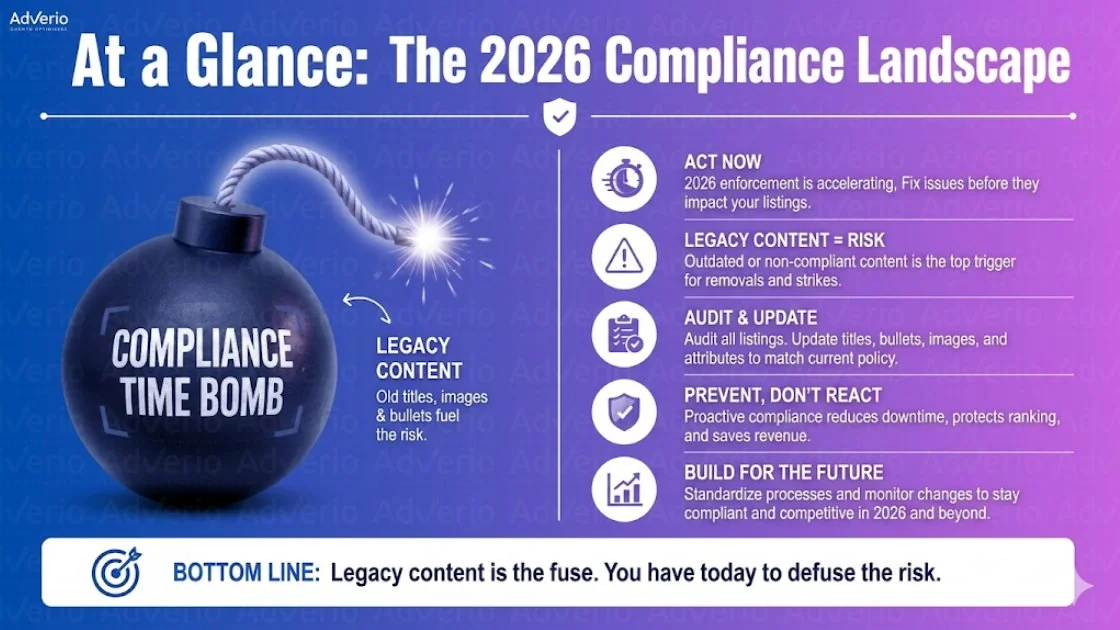
Most brands are carrying video debt they don’t track. Old claims. Outdated packaging. Unsupported demonstrations. Thumbnails built for yesterday’s standards. Amazon’s systems don’t care that the asset was approved once. They care whether it passes now.
That changes how you should think about Amazon listing optimization. Your video stack belongs inside your broader Amazon listing optimization process, not in a separate creative bucket.
How Amazon’s AI Enforcement System Works in 2026
Amazon now reviews listing videos like a risk model, not a creative gallery. The system checks the asset itself, the thumbnail, the spoken words, the captions, the burned-in text, and the product behavior shown on screen.
Legacy videos from 2021 to 2023 get hit hardest because they were built under looser review patterns and often contain stale packaging, old claims, or editing conventions that now read as manipulation.
Start with the enforcement sequence. Upload validation screens for file and formatting problems first. Then machine review parses frames, text, audio, and metadata. After that, Amazon maps what it found against category rules, claim restrictions, and listing-level context.
A video can be rejected even if the bullets still say the same thing. It can also stay live briefly, collect traffic, then get suppressed once the model reruns against newer policy logic.
The first filter is technical, and teams still fail it for preventable reasons. Unsupported file types, weak resolution, bad aspect handling, unreadable thumbnails, and sloppy exports create an easy rejection. Editing choices matter too.
Fast-cut comparison shots, tiny overlays, and side-by-side demonstrations often trigger extra scrutiny because the model reads them as possible before-and-after framing or implied superiority. If your team uses split-screen comparison techniques, audit every frame for claim risk before you upload.
The second filter is semantic review. Amazon’s systems read on-screen copy with OCR, transcribe speech, inspect subtitles, and classify visual scenes.
That is where old content debt starts costing money. A 2022 video that says “clinically proven,” shows packaging no longer sold, or implies a regulated outcome can get flagged today even if it passed on first submission.
Approval history means nothing once the model sees a current-policy violation.
Context matters more in 2026. Amazon does not review video in isolation. If the ASIN sits in a sensitive category, if the title makes an aggressive promise, or if customer reviews repeatedly mention outcomes your listing should not claim, the video inherits more risk. AI enforcement works across signals. One weak asset can expose the entire listing.
Opening frames carry compliance weight, not just conversion weight. If the first seconds delay the product, stack vague lifestyle footage, or front-load brand theater, teams usually cram the actual selling message into rushed overlays later. That is where bad claims, missing qualifiers, and unreadable text show up.
Clear product identification early reduces both confusion and policy exposure. The same compression of intent is consistent with Adverio’s AACR framework, which scores Rufus answerability and COSMO semantic coverage — both of which reward short paths to product relevance and immediate context signals.
Treat every approved legacy video as untrusted until it passes a fresh audit. Amazon’s 2026 system is not asking whether your asset used to get through. It is asking whether it should still be allowed now.
The Six Listing Elements Getting Brands Flagged Right Now
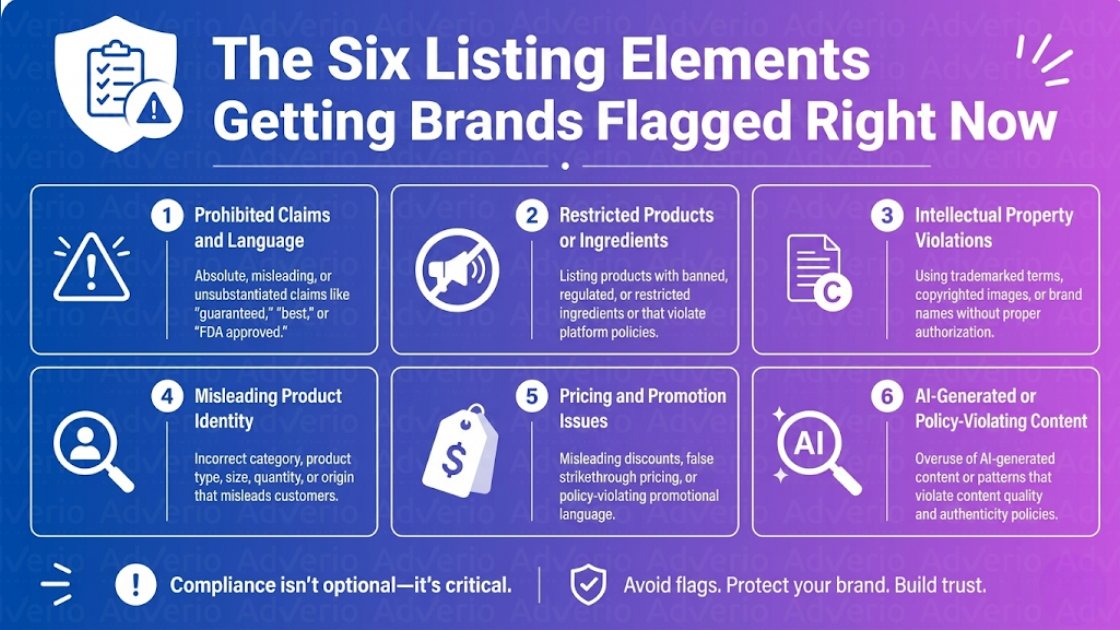
Amazon’s systems don’t reward creative vanity. They reward clarity, compliance, and relevance. These are the six areas where video teams keep creating expensive problems.
Element 1 Prohibited health claims and unsubstantiated efficacy language
This is the fastest way to turn a decent asset into a liability. If your video says or visually implies that a product treats, prevents, cures, or materially improves a medical condition, you’re taking a category-sensitive risk.
What it looks like
-
On-screen text promising relief from a condition
-
Voiceover claiming treatment outcomes
-
Visual demonstrations implying a medical result
-
Captions pairing words like “supports” or “improves” with a specific condition
What to do
-
Strip medical-condition references from video scripts unless you have category-appropriate approval and support
-
Rewrite overlays around use, features, and non-medical benefits
-
Review subtitles and burned-in text, not just the master script
Element 2 Missing required safety certifications for your category
A polished video won’t save a listing that lacks current category documentation. In fact, it can draw more scrutiny if it pushes a sensitive use case while your compliance file is weak.
What it looks like
-
Children’s, electrical, or wellness products shown in ways that trigger category expectations
-
Safety-focused claims in video without matching operational documentation
-
Legacy videos attached to ASINs whose requirements have changed since launch
What to do
-
Check current category requirements in Amazon’s workflow before refreshing video assets
-
Make sure the use cases shown in video align with what your documentation supports
-
Remove demonstrations that imply safety certifications you haven’t substantiated
Element 3 Keyword stuffing in title and bullets
This isn’t a video-only problem, but it wrecks video performance when the listing around the asset looks manipulative. Amazon video listing strategy works best when the PDP feels coherent, not stuffed.
What it looks like
-
Repetitive root-term variants across title and bullets
-
Mismatch between search-targeted copy and what the video demonstrates
-
Creative trying to compensate for a bloated, low-trust listing
What to do
-
Reduce duplication in core listing copy
-
Align video messaging with the top one or two real purchase drivers
-
Stop asking video to rescue bad merchandising
If your current reaction is “we need to fix my Amazon listings,” good. That’s the right reaction. Start with the core PDP and then clean the asset stack.
Element 4 Restricted content in images and video framing
Many brands know obvious before-and-after stills are risky. Then they recreate the same thing in motion and act surprised when the asset stalls or gets pulled.
What it looks like
-
Split comparisons implying dramatic transformation
-
Visual sequences that overstate outcomes
-
Side-by-side frames that move from problem to solved state in a way that reads like a prohibited claim
What to do
-
Show product use, not miracle transformation
-
Focus on feature demonstration and setup clarity
-
If you need comparative structure for education, study restrained professional split screen techniques that communicate process without drifting into prohibited claim territory
Keep the visual claim smaller than your legal risk tolerance. Most teams do the opposite.
Element 5 Supplier documentation and authenticity signals
Video can amplify trust, but it can also expose weak operational controls. If Amazon questions authenticity in your category, nice footage won’t matter.
What it looks like
-
Packaging in video that doesn’t match current shipped units
-
Brand presentation that raises authenticity questions
-
Supplier inconsistency between listing assets and what customers receive
What to do
-
Verify packaging, inserts, and visible product details before filming
-
Recut or replace old footage that shows retired packaging
-
Keep internal source-of-truth files for video-approved SKU visuals
Element 6 Review manipulation patterns in listing language
This is a subtle one. Teams borrow social proof language from DTC creative and carry it into Amazon assets. Bad move.
What it looks like
-
“Thousands of 5-star reviews”
-
Review-count boasting inside the video
-
Overlays that instruct or pressure shopper sentiment indirectly
What to do
-
Remove review references from video scripts and text overlays
-
Let the listing’s native review system do its job
-
Keep persuasion focused on product use, feature proof, and fit
The Listing Compliance Audit Process
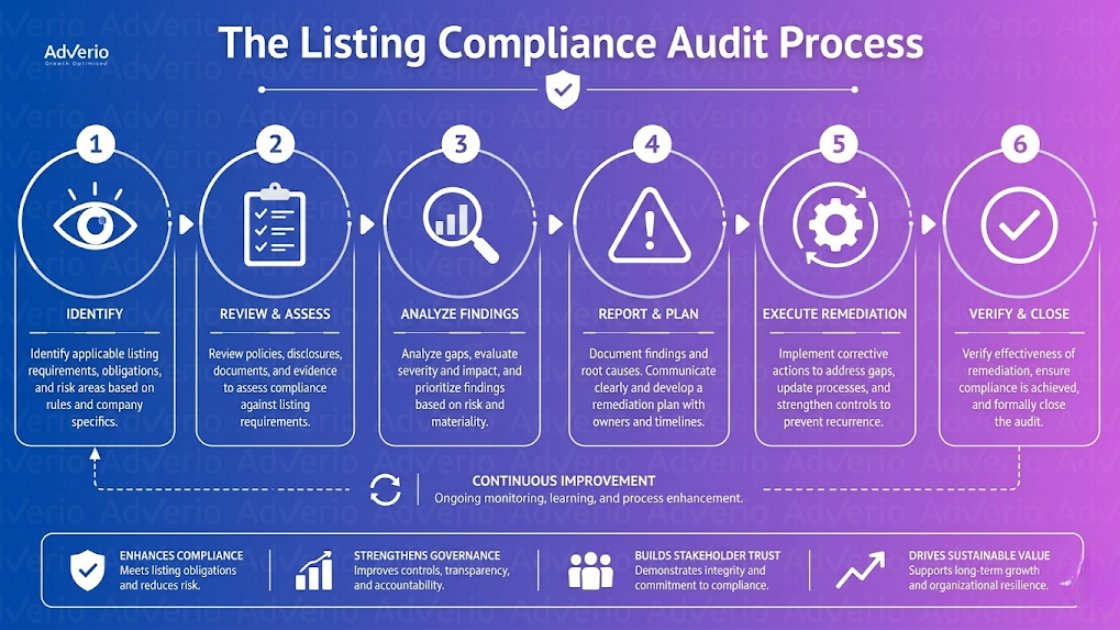
Legacy content is the trap. Videos approved in 2021, 2022, or 2023 often carry claims, packaging, subtitles, or implied use cases that passed weak moderation and now trigger 2026 enforcement. Your audit process has one job: find old risk before Amazon does.
The six-step audit
-
Export every live asset tied to each ASIN
Pull PDP videos, Sponsored Brands video variants, thumbnails, caption files, translated versions, and reused edits attached across child ASINs. Audit the asset map first. If you miss one inherited file, you miss the full risk. -
Match each asset to the current shipped product
Check packaging, inserts, labels, accessories, ingredients, colorways, and any on-screen text against what the customer receives now. Old footage showing retired packaging or prior formulas gets flagged fast because the AI compares visual and text inconsistencies at scale. -
Run a claim sweep across audio, captions, overlays, and metadata
Review spoken lines, subtitle files, lower thirds, title cards, and upload notes. Amazon does not care whether the risky claim sits in narration or a tiny text overlay. If it appears anywhere in the asset, it counts. -
Review frame by frame for implied compliance violations
Pause on treatment demonstrations, safety gear omissions, before-and-after visuals, child-use scenarios, medical-looking environments, and comparison shots. The subtle stuff is what legacy creative teams left behind, and what current enforcement catches. -
Verify category support and internal proof files
Confirm you still have substantiation, approvals, and supplier documentation for every claim or visual cue that survives review. If your team cannot produce support quickly, cut the content. Do not defend weak assets out of nostalgia. -
Document the fix at the asset level
Record the exact violation, affected ASINs, date removed, replacement file, and owner. This log matters because one noncompliant video can spread across multiple listings, and repeated rejections usually trace back to poor version control.
Run one fast text pass before the manual review. Search bullets, descriptions, A plus modules, captions, and video scripts for words like “relieves,” “reduces,” “treats,” “prevents,” “supports,” and “improves” when they sit near a health condition, symptom, or outcome. That wording is legacy debt in plain sight.
Pro Tip Quick Compliance Risk Finder
| Trigger Word |
|---|
| relieves |
| reduces |
| treats |
| prevents |
| supports |
| improves |
Use a second audit track for visibility issues. Compliance review answers “Can this stay live?” Ranking review answers “Why is this listing underperforming?” Keep those jobs separate. If you need the SEO side, use a dedicated process to uncover Amazon ranking leaks.
The same discipline applies outside Amazon. If your leadership team wants a clean operating model for content risk reviews across channels, the FTC’s guidance on substantiation requirements for advertising claims (ftc.gov/tips-advice/business-center/advertising-and-marketing) is a practical starting point.
How to Prioritize Which Listings to Audit First
Audits are often performed by annoyance. That’s stupid. Audit by revenue exposure.
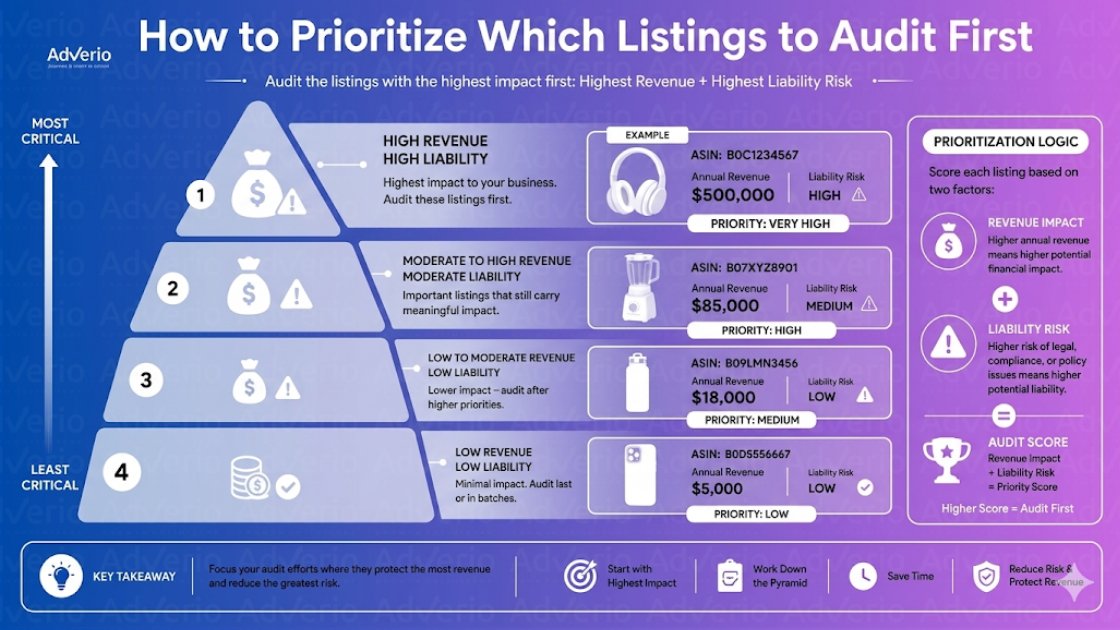
A compliance issue on a hero ASIN is a P&L event. A compliance issue on a tail SKU is administrative noise by comparison. The order should be brutally simple.
-
Start with hero ASINs: Highest revenue, highest traffic, highest downside.
-
Then hit shared assets: One reused video can spread risk across multiple associated ASINs.
-
Next review sensitive categories: Especially products with wellness, child, safety, or technical use-case exposure.
-
Leave low-impact SKUs for later: Clean them up after the money-makers are protected.
Catalog scale punishes undisciplined teams. If you’re managing broad assortments, Adverio’s guide for Amazon sellers is useful for structuring the workflow around SKU reality instead of wishful thinking.
For brands already facing enforcement fallout, this same prioritization logic matters before you start any Amazon account suspension recovery effort. Protect what drives the business first.
How Adverio Manages Listing Compliance Across Catalogs
Large catalogs break for one reason. No one owns the old content that still makes money.
That is a major risk in 2026. Brands are still carrying videos, A+ modules, image overlays, and comparison claims approved in 2021 to 2023 under looser review. Amazon’s enforcement systems are now re-scanning that backlog at scale. A listing can stay live for years, then get hit because an old asset suddenly fails a stricter model review.
Adverio handles that problem as an operating issue, not a creative task. The work sits inside account management, catalog governance, and change control.
That matters if you need a team to manage your Amazon account and clean up inherited listing debt before it turns into suppressed ASINs, blocked edits, or account health damage.
The practical approach is simple. Find reused assets across the catalog. Identify outdated claim language, risky visual text, and category-specific compliance exposure. Then fix the highest-risk shared content first so one bad legacy video does not keep spreading enforcement across connected ASINs.
This is not about making listings prettier. It is about reducing preventable revenue loss. If you want the commercial case mapped before changing anything, get the profit ROI forecast, as noted earlier.
Book Your ROI Forecast. 15-minute diagnostic call. No pitch deck.
Frequently Asked Questions
Does video actually create demand, or just convert existing demand better?
Video usually improves conversion more than demand creation. If search volume is weak, click share is concentrated, or the top results already absorb most buyer intent, video will not rescue the listing. Research on underserved Amazon demand points to whitespace signals like long-tail query gaps and weak results for high-value terms, as explained by Analyzer.tools on identifying unserved demand on Amazon. Use video to clarify the product, remove objections, and raise conversion rate. Do not expect it to fix a bad market or weak keyword positioning.
How many videos should I attach to an Amazon listing?
Use the number you can keep compliant. Amazon gives brands room for multiple videos on a listing, but that is not a reason to fill every slot.
For 2026, one clean, current video beats a stack of legacy assets from 2021 to 2023 that still carry old claims, banned overlays, outdated packaging, or comparison language that no longer passes review. Every extra asset increases audit time and enforcement surface area. Add a second or third video only if each one handles a specific job, such as product setup, sizing, or feature proof.
What’s the right video length for Amazon listings?
Keep listing videos short enough to survive review and hold attention. In practice, concise videos usually perform better because they force tighter messaging and reduce the chance your team stuffs in risky claims or excessive text.
For listing pages, aim for a brief product story with a clear demonstration. For ad placements, go even shorter. If a video needs a full minute to explain the value, the script is usually the problem.
What technical specs should my team use before upload?
Start with Amazon-approved file handling and supported formatting, as noted earlier. Then tighten your own internal standard. Use high-resolution source files, keep thumbnails clean, and avoid last-minute exports that introduce blurry text, cut-off captions, or packaging shots your current listing no longer matches.
The bigger risk is not the file type. It is legacy creative that technically uploads but fails policy review because the content inside the frame is now out of bounds. Audit spoken claims, on-screen text, medical or performance language, badges, seals, before-and-after visuals, and any reference to promotions. Teams get suspended over what the video says and shows, not just whether the file renders correctly.
Can Brand Registry help protect video assets and listing control?
It helps with control. It does not protect bad content from enforcement. Brand Registry makes ownership, edit access, and contribution control easier to manage, which matters if agencies, distributors, and in-house teams have all touched the same ASIN over the last few years.
That governance layer matters more in 2026 because old videos can stay attached long after the people who uploaded them are gone. If your team has not fixed that ownership problem, review the operational upside of Amazon Brand Registry benefits.
Read Next
-
Amazon review velocity strategy
Adverio works with established marketplace brands that need tighter control over listings, ads, and catalog risk across Amazon, Walmart, and Target. If your video assets are driving compliance exposure instead of conversion, Adverio is the conversation to have.