



Table of Contents
Let’s cut to the chase. Getting a bogus one-star review removed from Amazon feels like fighting a black box until you understand how Amazon actually enforces its rules. The reason most brands fail? They don’t understand the rules of the game.
Amazon doesn’t care whether a review is “unfair.” It cares whether it violates policy.

This isn’t a venting session; it’s a strategic playbook for mastering the amazon review removal tos. Stop arguing your case emotionally and start thinking like an Amazon policy enforcer. That means building a surgical, evidence-based report they can’t ignore.
The Real Stakes of Review Management
For any serious brand, this isn’t a nuisance, it’s a core business function. Fake reviews have snowballed into a massive problem, prompting Amazon to take aggressive, and sometimes blunt, enforcement action. Industry analysis estimates fake reviews contribute to nearly $788B in global commerce distortion, directly impacting buyer trust and conversion rates.
Research found that a staggering 43% of Amazon’s bestselling products had unreliable reviews. The problem is even worse in key growth categories like apparel (88% unreliable) and electronics (53%).
This isn’t about arguing with support. It’s about removing discretion from the decision entirely.
Every illegitimate review that sticks to your listing directly damages your conversion rates, poisons your ad performance (ACoS/RoAS), and chips away at the brand equity you’ve worked so hard to build.
From Frustration to a Framework
The good news? The system, while rigid, is predictable. Once you learn to spot clear violations and package your evidence concisely, your success rate will skyrocket. This guide delivers that clear, compliant path forward.
Here’s what we’ll cover:
-
Pinpointing Violations: How to spot the exact rule breaks that Amazon actually cares about.
-
Building Your Case: The specific proof you need to make your report undeniable.
-
Navigating the System: Using the right reporting channels, including the powerful tools available when you explore the benefits of Amazon Brand Registry.
Mastering the amazon review removal tos protects your bottom line and ensures your reputation isn’t sabotaged by those who refuse to play by the rules. It’s time to stop reacting and start executing.
Identifying Reviews That Violate Amazon’s Guidelines
Spotting a removable review isn’t about gut feelings or arguing fairness. It’s about pattern recognition. Amazon’s algorithms and moderators are trained to act on specific, clear-cut violations of their Community Guidelines. To win, you must think like they do—surgically identifying rule breaks.
Most brands only scratch the surface, looking for obvious profanity. The real opportunities are in the nuances of the amazon review removal tos. You need a mental checklist to scan feedback and pinpoint your best removal candidates quickly.
The Clear-Cut Violations
This is the low-hanging fruit—violations so obvious that a single report often gets the job done. They require zero interpretation and are the fastest to get taken down.
-
Seller-Specific Feedback: Any review focused on shipping, packaging, or customer service is seller feedback, not a product review. Phrases like “arrived late,” “box was damaged,” or “seller was rude” are immediate red flags. This content belongs in Seller Feedback, and Amazon is strict about the separation.
-
Obscenity or Hate Speech: This goes beyond four-letter words. Reviews containing profane, harassing, or threatening language are clear violations. Amazon’s filters usually catch these, but some slip through.
-
Personal Information: If a review includes any personally identifiable information (PII)—phone numbers, full names, email addresses—it’s an open-and-shut case for removal. Amazon has a zero-tolerance policy for PII in public-facing content.
These violations are your quickest wins. They’re binary—either the review contains this content or it doesn’t. There’s no room for debate, which is why they should be the first thing you look for.
The Less Obvious (But Still Removable) Reviews
This is where most brands miss opportunities. These violations are more subtle and require a closer reading of both the review and the amazon review removal tos. Mastering these will significantly boost your success rate.
One of the most common is a promotional review. If a customer mentions a competitor’s brand by name (“The product from Brand X is way better”) or links to an external website, it violates the rule against advertising. This policy is designed to stop brands from hijacking competitor listings, and you can absolutely use it to your advantage.
Another high-miss category is low-information or non-substantive reviews. A one-star review that just says “terrible” or “broken” without context can sometimes be removed, though it’s less of a sure thing. The argument is that it provides no useful information to other customers—the entire point of the review system.
Beyond Amazon’s specific TOS, there are general strategies to remove fake reviews quickly that can broaden your defensive toolkit.
Spotting these violations is a skill. It requires shifting your perspective from “this review is unfair” to “this review breaks rule 4.2 of the Community Guidelines.” That’s the language Amazon understands.
Finally, look for misplaced content. This includes product questions (“How do I turn this on?”) or comments about pricing and availability (“Too expensive,” “I found it cheaper elsewhere”). These aren’t product critiques and don’t belong in the review section. By proactively managing your listings and encouraging positive feedback through compliant means, such as an effective Amazon Vine review strategy, you build a stronger foundation against unhelpful comments.
Training your team to recognize these patterns turns review management from a frustrating chore into a strategic brand defense mechanism. It lets you systematically clean your listings, protect your conversion rates, and ensure your product’s reputation is built on authentic customer feedback, not rule-breaking noise.
Review Violation Quick Reference Guide
To speed things up, here’s a quick-scan table to help you identify the most common review policy violations that Amazon will act on. Keep this handy when you’re combing through your listings.
| Violation Type | What to Look For (Keywords & Phrases) | Why It’s Removable |
|---|---|---|
| Seller/Shipping Feedback | “Arrived late,” “damaged box,” “rude seller,” “shipping took forever,” “bad packaging” | This content belongs in Seller Feedback, not the Product Detail Page. It’s not a product critique. |
| Obscenity/Hate Speech | Profanity, threats, slurs, harassing language, or any abusive content. | Violates Amazon’s core Community Guidelines and creates an unsafe shopping environment. |
| Personal Information (PII) | Full names, phone numbers, physical addresses, email addresses, or social media handles. | A severe privacy violation. Amazon has a zero-tolerance policy for sharing PII. |
| Promotional Content | Mentions competitor brands, links to external sites, or includes discount codes. | Considered advertising or spam, which is explicitly forbidden in product reviews. |
| Pricing/Availability | “Too expensive,” “found it cheaper at Walmart,” “out of stock,” “price changed.” | Comments about price and availability are considered temporary and not a review of the product itself. |
| Misplaced Questions | “How does this work?”, “Is it compatible with X?”, “Where are the instructions?” | These belong in the “Customer Questions & Answers” section, not as a product review. |
Using this guide helps you move past the emotional response to a bad review and focus on the objective, rule-based arguments that get results. It’s about speaking Amazon’s language.
How to Build and Submit Your Case to Amazon
Finding a review that breaks Amazon’s rules is one thing. Proving it is the real challenge. Your job isn’t to write a novel about why a review is unfair; it’s to build a concise, evidence-based case that makes removal the only logical option for the support agent on the other end. Treat every submission like a compliance audit, not a complaint.
Success here is all about clarity and speed. Amazon support teams are slammed. If your report is confusing or makes them hunt for information, it’s getting rejected. Period. Your submission needs to be so clear that an agent can validate your claim in under 60 seconds. This means directly linking quotes from the review to specific policy violations, backed by screenshots and order details.
Assembling Your Evidence Pack
Before you hit “Report,” get your evidence in order. A solid evidence pack should be lean but powerful, containing only what’s necessary to prove your claim. Anything extra is just noise.
Here’s the bare minimum you need for every single removal request:
-
A Direct Link to the Review: Grab the permalink. Don’t just send a link to your product page and make them search for it.
-
The Reviewer’s Display Name: Note the exact name the reviewer used.
-
The Date of the Review: This helps Amazon’s team find it instantly.
-
The Order ID (If Possible): This is your silver bullet. If you can confidently link the review to an order, include the ID. It’s especially powerful for reporting seller feedback disguised as a product review.
-
A Screenshot of the Review: A clean, unedited screenshot is your insurance policy. It serves as undeniable proof, especially if the reviewer tries to edit their comment later.
You want to hand them an open-and-shut case. The less digging the Amazon agent has to do, the better your odds.
The core principle is simple: make it easy for Amazon to say yes. Provide the link, the quote, and the policy violation. That’s it. Anything more is a distraction.
While this guide is about Amazon, the principles are universal. For instance, this detailed guide on getting a Google review removed follows a similar logic: evidence-based reporting is key, no matter the platform.
Choosing Your Reporting Channel: Seller Central vs. Brand Registry
You have two main ways to submit your case: Seller Central and Brand Registry. They might seem similar, but they’re built for different problems and have different success rates.
Seller Central Reporting (The “Report” Button)
This is your frontline tool, the most direct way to flag a violation. You’ll find a “Report” button next to every review.
-
Click the “Report” link next to the review.
-
A pop-up will appear, asking you to pick a violation type.
-
Choose the closest match, like “Inappropriate content” or “It’s about shipping or packaging.”
-
Hit submit.
This channel is perfect for black-and-white violations—profanity, personal information, or blatant seller feedback. It feeds into a high-volume queue where bots and agents can quickly act on obvious rule breaks.
Brand Registry Support
For trickier cases—like suspected competitor sabotage or violations requiring more explanation—Brand Registry support is your go-to.
-
Log in to your Brand Registry account.
-
Go to “Support” and then “Contact Brand Support.”
-
Find the right path, often under “Listings” and then “Other listing issues.”
-
Write a short, sharp message laying out the violation, including all your gathered evidence.
Brand Registry agents are typically more experienced and have better tools for deeper investigations. Use this channel when the standard “Report” button gets you nowhere or when the issue needs more context. But be careful. Misusing these channels can lead to repeated rejections, which can snowball into bigger issues. Knowing how to handle an Amazon seller account suspension is a crucial skill for any serious seller.
Crafting the Perfect Submission Note
Your submission note is your closing argument. It needs to be factual, direct, and completely free of emotion. Stick to a simple, repeatable template that gets straight to the point.
Here’s a template that works:
-
Review Permalink: [Insert permalink here]
-
Reviewer Name: [Insert reviewer’s display name]
-
Violation: [State the specific policy, e.g., “Seller Feedback”]
-
Quote from Review: “[Insert the exact quote from the review]”
-
Reason for Removal: “This review violates Amazon’s Community Guidelines as it focuses exclusively on shipping and delivery, which is seller feedback, not a product review.”
This process flow diagram breaks down how to think about the most common violations.
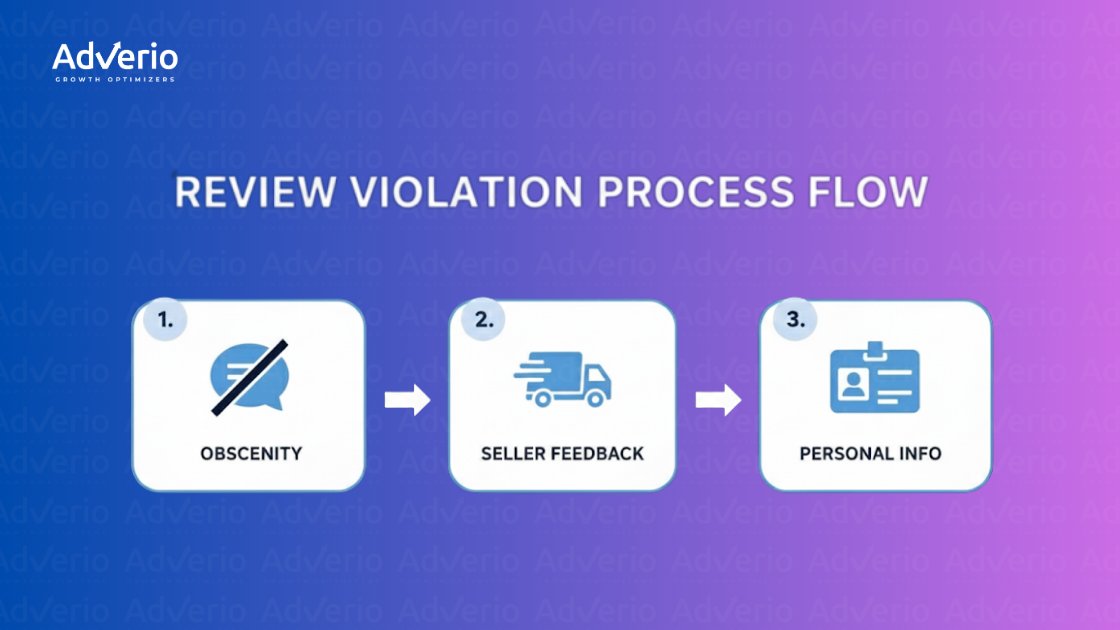
This visual reinforces how important it is to correctly categorize the violation before you even start building your case.
When you adopt this methodical, evidence-first approach, you stop gambling and start operating a predictable system for protecting your brand’s reputation.
What to Do When Amazon Says “No”
If Amazon says “no,” assume your evidence wasn’t frictionless, yet.
An initial rejection is frustrating, but it’s rarely the final word. Many brands see that first denial and assume the case is closed. That’s a mistake. Think of it less as a rejection and more as feedback. Amazon is telling you that your first attempt wasn’t clear enough or lacked the right proof.
The worst thing you can do is reopen the same case with the same information. You’ll get a second, even faster, rejection. Instead, dissect the review and your initial report. Did you pick the wrong violation category? Was the quote you pulled too vague? Did you forget a key piece of evidence, like an Order ID?
A “no” often just means the support agent couldn’t quickly verify your claim. Your job now is to rebuild your case so the violation is impossible to miss.
Rebuilding and Escalating Your Case
Once you’ve figured out why your first request failed, it’s time to build a stronger case. This isn’t about being loud; it’s about being methodical and precise. You want to eliminate every bit of ambiguity that led to the initial denial.
Here’s how to structure your second attempt:
-
Re-evaluate the Violation: Make sure you’ve picked the most accurate and easiest-to-prove violation. For example, if a review complains about shipping and mentions a competitor, report it as “Seller Feedback.” Why? Because a shipping complaint is objective and less debatable than proving “Promotional Content.” Always choose the path of least resistance.
-
Strengthen Your Evidence: Add more context. If you can definitively link the reviewer to an order, include the Order ID. Also, add a single sentence explaining why the quote violates the policy. Something like: “This quote directly references shipping times, which is seller-specific feedback per Amazon policy.” Make it dead simple for them.
-
Choose a Different Channel: If you used the standard “Report abuse” button, try escalating through Brand Registry Support. These agents typically have more training and are better equipped for nuanced cases. Frame your request clearly and reference the original case ID if you have it.
Repeatedly failing to follow Amazon’s rules—even in your removal requests—can put your account at risk. Properly appealing these issues is a core competency, just like understanding what to do if you ever need to navigate an Amazon account suspension.
When to Escalate Beyond Seller Support
Sometimes, you’ll hit a wall that Seller Support or even Brand Registry can’t handle. These situations are rare, but it’s critical to know when you’re in one. We’re talking about severe issues like defamation, threats of physical harm, or a coordinated review-bombing campaign from a competitor.
An initial ‘no’ from Amazon isn’t the final word. It’s an invitation to present a clearer, more compelling, evidence-based case that leaves no room for misinterpretation.
In these extreme scenarios, your options get narrower but carry more weight. Document everything—every review, every case ID, every interaction with support. This documentation is your foundation for a potential report to Amazon’s legal department. This isn’t a step to take lightly; reserve it for cases where a review is causing tangible, significant harm to your brand’s reputation or poses a legitimate legal threat.
Ultimately, turning a rejection into a removal is about shifting your mindset. You’re no longer just making a request; you’re presenting a well-argued case. By refining your evidence, escalating intelligently, and knowing when to bring in the heavy hitters, you build a repeatable process for protecting your brand.
Proactive Strategies for Brand Reputation Management
Reacting to bad reviews is a defensive game. On Amazon, defense keeps you alive. Offense is what compounds growth.
Sure, mastering the amazon review removal tos is key for cleaning up listings, but a truly resilient brand builds a reputation so strong that the occasional negative comment barely makes a dent. This means ditching the reactive mindset and building a proactive strategy focused on generating a steady, authentic stream of positive feedback.
It’s about building a defensive moat around your brand equity. A proactive approach doesn’t just drown out the bad—it also protects you from Amazon’s own automated systems.

We’ve seen it happen. Amazon’s machine-learning models don’t just target obvious fakes; they can retroactively flag and delete legitimate-looking positive reviews without warning. Between 2023 and 2024, sellers frequently reported losing entire blocks of five-star reviews overnight. One brand we know lost 31 in a single month.
For a product with an average number of reviews, losing 20-30% of them can absolutely crush conversion rates and ad efficiency. You can see the fallout for yourself in these Seller Central discussions.
Building a Compliant Review Generation Engine
Generating positive reviews isn’t about finding loopholes; it’s about using Amazon-approved programs and delivering an experience that compels customers to share their feedback. Forget the risky tactics—the only sustainable path is through compliant, value-driven strategies.
Here are the pillars of a strong review generation engine:
-
Leverage the Amazon Vine Program: For brand-registered sellers, Vine is a must-use tool for getting new products off the ground. Amazon gives your product to a pre-vetted group of trusted reviewers, “Vine Voices,” known for providing detailed, unbiased feedback. This lends immediate credibility to a new listing.
-
Create an Exceptional Customer Experience: The best five-star reviews are organic, from customers who are genuinely impressed. This goes beyond the product itself. Think about the entire journey, from unboxing to daily use. High-quality packaging, clear instructions, and a product that over-delivers are your most powerful review-generation tools.
-
Monitor Review Velocity and Sentiment: Keep a close eye on the rate and tone of incoming reviews. A sudden spike in one-star ratings can signal a competitor attack or a legitimate product defect that needs immediate attention. Catching these patterns early allows you to fix the root cause before your overall rating nosedives.
The Power of Post-Purchase Engagement
That post-purchase window is a critical, often-overlooked opportunity to connect with customers. It’s not about directly asking for a five-star review—a clear TOS violation. It’s about providing value that makes the customer want to support your brand.
The goal isn’t to ask for a positive review. The goal is to create a customer so satisfied that leaving a positive review feels like a natural next step.
This is where thoughtful engagement makes all the difference. You can use product inserts to offer warranty registration, provide helpful usage tips, or share your brand’s story. By focusing on customer success, you create a positive association that often translates directly into glowing reviews. Our guide on product inserts that get reviews without asking for them dives deep into executing this compliantly. This strategy is about building a community, not just processing transactions.
When you combine a robust, compliant review generation strategy with a deep understanding of the amazon review removal tos, you create a powerful system for both building and protecting your brand’s most valuable asset on the marketplace—its reputation.
Answering Your Toughest Questions About Amazon Review Removal
When you’re in the trenches, navigating the rules around review removal can feel like a minefield. Theory is one thing, but practical, in-the-moment decisions are what matter. Here are the straight-up answers to the questions we hear most from brand leaders.
How Long Does This Actually Take?
Let’s be real: there’s no fixed timeline. You’ll typically get an initial canned response from Seller Support within 24 to 72 hours, but the actual removal can be a waiting game—anywhere from a few days to a couple of frustrating weeks.
If the violation is screamingly obvious, like profanity or private contact info, it moves faster. But nuanced cases? Think a suspected competitor attack cleverly disguised as a genuine bad experience. Those require a deeper investigation and stretch the timeline out.
Pro Tip: Always document your case ID. If a week goes by with radio silence, don’t just sit there. Follow up on that same case ID to show you’re serious.
Can I Just Ask a Customer to Take Down a Bad Review?
No. Don’t even think about it.
Directly asking a customer to remove or change a negative review is one of the brightest red flags you can wave at Amazon. It’s a fast-track ticket to an account suspension, and they consider it a severe violation of their anti-manipulation policies.
What you can do is contact a customer to solve their problem. If you deliver world-class customer service and they—completely on their own—decide to update their review, that’s fine. But you can never tie your resolution to their review or offer compensation for a change. The conversation must be 100% about fixing their issue, not managing your public feedback.
So, What’s the Real Penalty for Breaking These Rules?
The consequences aren’t a slap on the wrist; they’re severe enough to cripple a business. Amazon has a zero-tolerance policy for review manipulation and has invested heavily in systems to catch it.
The penalties escalate quickly:
-
A temporary suspension of your listing privileges.
-
A permanent ban of your seller account.
-
Wiping every single review from your products.
-
Permanently withholding all your funds.
-
In extreme cases, legal action.
Their automated systems are frighteningly good at sniffing out prohibited tactics like incentivized reviews, review-gating, or using off-platform groups to coordinate feedback. The risk always outweighs any short-term gain. The only game worth playing is strict, unwavering adherence to Amazon’s rules.
Amazon Won’t Remove a Review That’s Just Plain Untrue?
Unfortunately, no. This is a tough pill for many brand owners. Amazon will not act as the arbiter of truth.
Reviews are considered subjective opinions, not factual reports. Your entire removal request must be built on proving a specific violation of the Community Guidelines, not on proving the customer is wrong.
For instance, a customer claiming your blue shirt “looks green” is their opinion. No violation there. But if they say it “looks green and the seller is a fraud,” you now have a personal attack. That’s your angle for removal.
If a customer’s claim is just inaccurate but doesn’t break a rule, your only move is to post a public, professional reply. Give other shoppers context. It’s not the win you want, but it’s the correct strategic play.
If review risk is already costing you conversion, ads, or buy-box stability, you’re reacting too late. Adverio builds growth engines that protect your brand equity while driving profitable scale. We turn complex marketplace rules into your competitive advantage.
Book Your ROI Forecast and see how our proprietary systems can safeguard your reputation and accelerate your growth.