


Table of Contents
Most Amazon account health advice is lazy. Check Seller Central. Keep your metrics green. React when Amazon throws a warning. For brands running complex catalogs at $3M or more in revenue, that’s not a strategy. It’s a delay tactic.
That advice is already too late.
A serious amazon account health assessment is not a checklist. It’s a state diagnosis. Your account is always in a condition that demands a specific response. Healthy. Degrading. Partially suppressed. Critically suppressed. Recovering. If you don’t know which state you’re in today, you’re managing risk blind.
For brands with complex catalogs, one suppressed hero ASIN can do more damage than a mediocre ad account ever will. Start by diagnosing state, not symptoms. If you want a team already running this system, explore Adverio’s Amazon account management approach and see what proactive monitoring actually looks like.
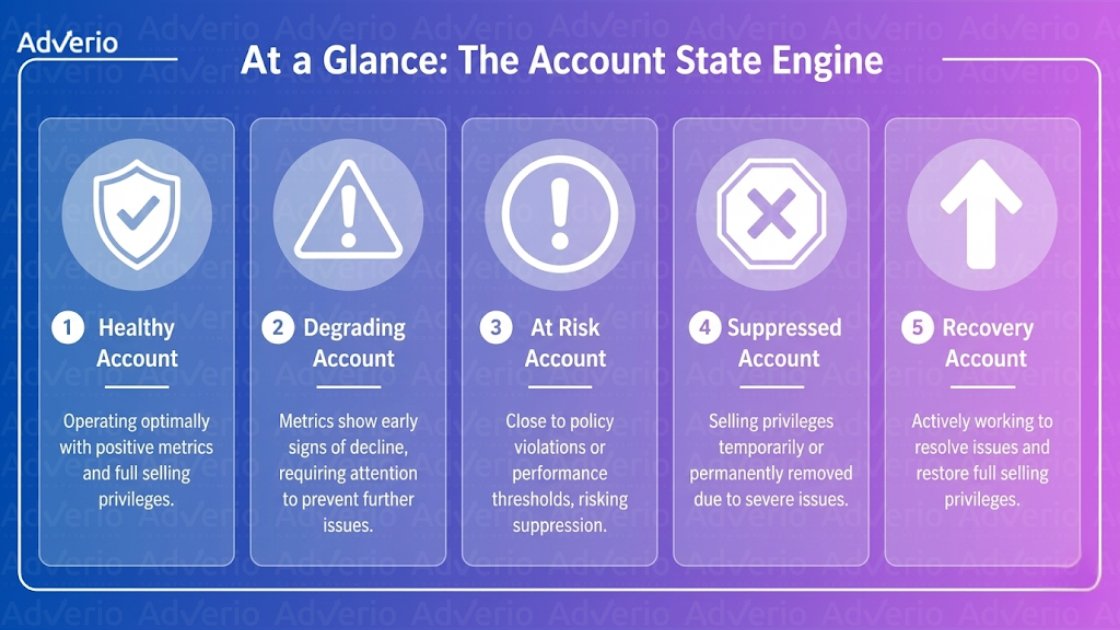
At a Glance: The Account State Engine
-
Your account is never neutral: It is always operating in one of five states, and each state needs a different operating protocol.
-
Amazon’s dashboard is not enough: It shows official problems. It does not reliably show early degradation, hidden friction, or the operational patterns that create bigger trouble later.
-
The primary job is state detection: Strong operators watch proxy signals like Buy Box instability on hero ASINs, stranded listings, complaint patterns, and policy warning activity before revenue damage gets obvious.
-
Recovery is not the same as health: Fixing a violation and rebuilding trust are different jobs. Too many brands confuse reinstatement with stability.
-
Brand risk and account risk overlap: If you ignore off-listing threats like unauthorized sellers, counterfeit complaints, or content misuse, start with a practical guide to brand monitoring and tighten the perimeter.

Amazon account health assessment: the state engine model 20
Why Account Health Degrades Silently Before It Collapses Visibly
Amazon gives you a dashboard. Operators treat it like a warning system. That’s the mistake.
The dashboard is a rearview mirror. It tells you what already happened. By the time a metric crosses a formal threshold, the commercial damage has usually started somewhere else first. Buy Box volatility. Lower conversion on hero ASINs. More stranded inventory. More buyer complaints tied to the same listing family. More support tickets with no obvious root cause.

Amazon’s Account Health Rating runs on a rolling 180-day window. Buy Box eligibility is tied directly to health status, and an Order Defect Rate above 1% can trigger deactivation. The math is simple: your account can look survivable on the dashboard while Amazon has already started reducing your commercial position.
A lot of operators wait for a red flag. That’s amateur behavior.
If your customer experience is slipping, Amazon does not need to send you a dramatic memo before reducing your economic position. It can happen through softer penalties first. Visibility gets less stable. Buy Box control weakens. Search placement gets harder to defend. Internal teams blame ads, pricing, or seasonality because those are easier to talk about than account degradation.
When you do return to ads after fixing account state, make sure your Amazon PPC management is built to scale on a clean foundation, not patch over a degraded one.
The leading indicators that matter
A smarter amazon account health assessment uses official metrics and proxy signals together. You need both.
Look for combinations like these:
-
Policy friction plus catalog instability: A small warning paired with stranded or suppressed child ASINs.
-
Operational slippage: Late shipping pressure, cancellation pressure, or tracking weakness showing up alongside customer complaints.
-
Commercial instability: Buy Box inconsistency on top revenue drivers with no obvious price change.
-
Brand risk leakage: Authenticity or IP complaint patterns that don’t line up neatly with visible dashboard tiles.
The Account State Engine doesn’t wait for Amazon to declare an emergency. It classifies the account before the visible collapse. That’s the difference between prevention and cleanup.
The Five Account States Every Operator Must Know
State 0 Active and Healthy
Most of the time, your operations should be not just technically compliant, but commercially stable.
In this state, your health metrics are green, policy warnings are absent or resolved, and the account is not showing hidden instability. You’re not spending your week chasing support cases. You’re pushing offense. Growth, conversion, contribution margin, market share.
What healthy looks like in practice:
-
Order quality is under control: ODR stays below Amazon’s threshold.
-
Shipping execution is clean: Late shipment and cancellation pressure are not creeping up.
-
Listings are structurally sound: Content quality, variation logic, and catalog hygiene are stable.
If your content quality is weak, tighten it now with Adverio’s Amazon listing optimization process before suppression forces the issue.
-
Buy Box behavior is predictable: Your core ASINs aren’t producing sudden eligibility surprises.
The right response here is discipline. Weekly monitoring. Monthly audits. No complacency.
State 1 Active and Degrading
This is the state most brands miss.
Your account is still active. Revenue is still coming in. Nothing looks catastrophic. But the signals are getting ugly. One metric is drifting. A cluster of listings is getting noisier. A complaint category starts repeating. Buy Box consistency gets weird on a hero variation. You haven’t been hit hard yet, but the account is bending in the wrong direction.
This state usually hides behind false explanations. Teams say conversion is soft because of the market. They say ad efficiency is down because competition got aggressive. Sometimes that’s true. Sometimes the account is just degrading and nobody wants to admit it.
Watch for patterns, not isolated issues:
-
Repeated defects tied to the same ASIN family
-
Operational errors grouped around a date range
-
International or channel-specific friction
-
Unresolved low-severity policy issues that keep hanging around
Healthy accounts don’t become dangerous overnight. Teams ignore weak signals until Amazon turns them into expensive signals.
The response is focused containment. Pull reports. Trace the defect source. Fix root causes before they graduate into formal account damage.
State 2 Partial Suppression
Now the problem is visible.
You still have an account, but parts of it are impaired. One or more listings are suppressed, stranded, inactive, or commercially handicapped. This can happen at the ASIN level long before operators appreciate the account-level implications. If your hero item is compromised, the fact that the rest of the catalog is still live won’t save your month.
State 2 usually comes with yellow-zone behavior. You may still be selling, but not cleanly. Some catalog sections are operating normally while others are choking.
Indicators include:
-
Suppressed or stranded listings
-
Policy warnings tied to specific products
-
Buy Box weakness concentrated in top revenue ASINs
-
Complaint or authenticity issues attached to branded products
The correct response is triage. Identify which ASINs matter most financially, isolate the trigger, and stop making broad changes across the whole catalog. Random edits make this worse.
State 3 Critical Suppression
Leadership gets pulled into the room.
Multiple ASINs are affected, or account-level action is on the table. Your score is under real pressure. Seller privileges may be restricted, deactivation risk increases, and every hour of confusion costs money. This is not a “monitor and see” situation.
If the account has moved here, stop pretending the issue is tactical. It’s operational and executive. You need a response path, evidence, ownership, and sequence.
Common signs:
-
Account health score under pressure with serious warnings
-
Multiple commercial assets impaired at once
-
Amazon requiring immediate response or a formal Plan of Action
-
Revenue impact spreading beyond one listing cluster
If you’re already here, you may need a dedicated process for Amazon account suspension recovery. The worst move is a rushed, vague appeal that admits nothing clearly, proves nothing concretely, and solves nothing structurally.
State 4 Recovery
Recovery is not “problem solved.” Recovery is controlled rebuilding.
A warning may be resolved. A listing may be reinstated. A policy issue may be cleared. That does not mean the account is back to normal. Trust, ranking, and conversion don’t snap back on command. The account needs stabilization work after the obvious fire is out.
State 4 is where disciplined operators separate from frantic ones. They don’t just celebrate reinstatement. They monitor whether the original cause is gone and whether the account’s commercial signals are normalizing.
The response in recovery should include:
-
Validation: Confirm the specific trigger was resolved.
-
Rebuild: Restore listing quality, retail readiness, and customer experience.
-
Observation: Watch for repeat complaints, hidden policy drag, or unstable Buy Box behavior.
-
Prioritization: Fix what protects revenue first, not what feels emotionally satisfying.
How to Identify Which State Your Account Is In Right Now
Operators get this wrong because they stare at isolated metrics and miss the account’s actual condition. The Account State Engine fixes that. Your job is to identify the current state fast, using leading indicators that show deterioration before revenue, rank, or deactivation risk becomes obvious.
Step 1: Classify the account from the dashboard, then challenge that classification
Open Account Health in Seller Central and record the visible condition first. Account Health Rating, color status, shipping defects, customer service issues, policy violations, and product compliance alerts all matter. Amazon’s own Account Health guidance makes the threshold clear. Green does not mean safe forever, and low ratings can put the account at risk of deactivation, as explained in Amazon’s Account Health and policy compliance help documentation.
Then do the part weak operators skip. Ask whether the dashboard is lagging reality.
An account can still sit in an acceptable range while its top ASINs are slipping, warnings are accumulating, and operational defects are clustering. That is not a healthy account. That is a State 1 or State 2 account pretending to be fine.
Step 2: Look for defect concentration, not defect totals
Pull recent order, return, and voice-of-customer data. You are hunting for concentration by ASIN, fulfillment node, carrier, handling-time window, and complaint type.
One pattern matters more than a scattered pile of incidents. If negative feedback, A-to-z claims, late shipments, or return reasons are piling up around the same product or process, you have identified the system creating future damage. This is the same logic behind Halo AI’s customer health scoring. Strong operators classify risk from grouped signals, not from one metric viewed in isolation.
Do not waste time asking whether the issue is “big enough” yet. If the pattern is repeatable, it is already expensive.
Step 3: Audit listing integrity on revenue-critical ASINs
A healthy dashboard can hide a weak catalog. Review suppressed listings, stranded inventory, variation issues, missing attributes, compliance flags, image problems, and content changes on your highest-revenue ASINs.
State classification should be revenue-weighted. If three low-volume listings are suppressed, that is cleanup. If your top sellers are suppressed, stranded, or content-fragile, your account has moved out of State 0 whether Amazon has punished it yet or not.
Tighten titles, images, attributes, and content structure now with Adverio’s Amazon listing optimization service before listing weakness turns into policy friction or conversion loss.
Step 4: Check Buy Box stability where it actually matters
Do not average Buy Box performance across the full catalog. That is how operators hide a serious problem behind a pretty report.
Review Buy Box share and availability on the ASINs that carry the business. If top products are losing consistency and price alone does not explain it, you may be dealing with fulfillment instability, suppressed offers, contribution conflicts, or account-level trust drag. Those are state signals, not isolated events.
Step 5: Count unresolved warnings, then test whether they are truly closed
Sellers love saying an issue was “handled.” Amazon cares whether it was resolved in Amazon’s system.
Count every active warning, every unresolved complaint, every open policy notice, and every edge case that still lacks a clean status. Then verify closure. If the operational team made a change but the warning remains live, the account is still carrying risk. If the same warning type keeps returning, your root cause is still in place.
That final check is what separates a checklist from a diagnostic system. The Account State Engine does not ask whether you reviewed the account. It asks whether the account is stable, drifting, impaired, critical, or recovering, and whether the evidence supports that call right now.
The Account State Diagnostic Checklist
Operators love vague language because it delays accountability. Use a scorecard instead.
A good account diagnostic behaves a lot like Halo AI’s customer health scoring. You don’t rely on one signal. You classify risk based on a basket of leading and lagging indicators.
JumpFly notes that a strong audit should include ODR below 1%, Late Shipment Rate below 4%, and Valid Tracking Rate above 97%, while 60% of defects come from inventory shortages or carrier delays and proactive monthly audits lead to 92% health maintenance, according to JumpFly’s account health audit guide.
| Metric | Healthy Range (State 0) | Watch Range (State 1) | Action Required (State 2+) |
|---|---|---|---|
| Order Defect Rate | Below 1% | Trending upward toward threshold | Investigate defect source and correct root cause immediately |
| Late Shipment Rate | Below 4% | Drifting toward threshold | Audit carriers, handling time, and warehouse execution |
| Valid Tracking Rate | Above 97% | Slipping below healthy range | Fix carrier mapping and shipping confirmation process |
| Policy warnings | None active or all resolved | Minor unresolved warnings | Escalate, document, and close before severity expands |
| Suppressed or stranded listings | None on meaningful ASINs | Limited listing-level issues | Prioritize hero ASIN recovery and isolate root trigger |
| Buy Box on hero ASINs | Stable and consistent | Volatile without clear retail cause | Audit health, listing quality, and offer competitiveness |
| Complaint concentration | Isolated and explainable | Repeating by ASIN or issue type | Review authenticity, listing accuracy, and product experience |
| Catalog quality | Clean, compliant, stable | Content gaps or variation friction | Fix Amazon listing optimization before they create bigger account risk |
Operator note: If the same defect keeps appearing, stop treating it as customer noise. It’s a system failure with a delayed bill.
What Moves an Account Between States
Accounts don’t drift by accident. Something pushes them.

The obvious triggers come from inside your own operation. Inventory instability. Shipping slippage. Listing edits that create policy friction. Support processes that mishandle complaints. Those are self-inflicted.
The harder triggers come from outside. Competitor reporting campaigns. IP complaints. Authenticity attacks. Abrupt enforcement shifts. Forum discussions show many sellers reporting mysterious 4-point deductions without visible violations, often tied to hidden or delayed flags like IP or authenticity complaints, according to this Amazon Seller Forums discussion about unexplained AHR drops.
Internal triggers
-
Inventory shortages: They create cancellations, missed service expectations, and support friction.
-
Carrier failures: Tracking and delivery issues turn into customer-facing defects fast.
-
Catalog mistakes: Variation abuse, unsupported claims, or sloppy content updates can trigger suppression.
-
Process drift: Teams solve one-off tickets but never fix the repeated cause.
External triggers
-
IP and authenticity complaints
-
Unauthorized seller activity
-
MAP breakdowns that invite channel conflict
-
Competitor pressure campaigns
If you sell branded products, this overlap matters. Problems tied to MAP violations and account health and broader Amazon brand protection are not separate from account state. They’re often upstream causes.
How Adverio Helps: Real-Time Account State Monitoring
Reactive teams watch for violations. Serious operators track state shifts before Amazon makes the damage obvious.
Adverio Growth Optimizers monitor account state as an operating system, not a reporting task. They review daily account health signals, classify the account inside the Account State Engine, and trigger escalation based on early movement, not visible fallout. That means catching the account while the problem is still containable, before suppression hits revenue and before support tickets turn into executive panic.
The method is simple and disciplined. Map the five states. Define the leading indicators for each one. Set thresholds for action. Assign ownership across catalog, operations, and brand protection. Then force response times that match the risk level.
If your team still relies on weekly screenshots, scattered case logs, and someone “keeping an eye on it,” you do not have monitoring. You have delay disguised as process.
Real-time monitoring matters because account health failure rarely starts on the Account Health page. It starts in weak signals: a complaint pattern clustering around a product family, a support issue repeating in the same fulfillment lane, a listing change that raises enforcement risk, or an unauthorized seller problem spilling into authenticity friction. The Account State Engine treats those as transition signals. That is the difference between a managed account and an exposed one. If you want that system running on your account, see what’s included in Adverio’s full Amazon account management service.
Frequently Asked Questions
Can a large catalog hide serious account health problems?
Yes. Large catalogs create camouflage. Weak ASIN clusters disappear inside broad averages, especially when teams review account health at the account level instead of the hero-ASIN level. State diagnosis has to focus on the concentration of risk, not aggregate metrics
Can high sales volume protect me if my percentage metrics still look acceptable?
Not always. For branded sellers, absolute complaint volume can matter more than percentage-based comfort. Amazon can prioritize raw complaint counts for issues like inauthenticity, which leaves high-volume brands more exposed. Selling cheap non-branded items to dilute the ratio is a bad workaround if you’re protecting a premium brand.
What’s the first move if I identify State 2 partial suppression?
Contain the problem. Identify the financially important ASINs affected, pause random catalog edits, isolate the trigger, and document evidence before filing responses. Then use a strict decision sequence so the highest-value risks get handled first.
Does fixing the violation mean the account is healthy again?
No. That only means you may have exited the immediate failure state. Recovery still requires monitoring Buy Box behavior, listing quality, customer complaints, and repeat warning patterns. Reinstatement is administrative. Health is operational.
If your account state is unclear, your risk is higher than you think. Adverio helps brands turn Amazon chaos into an operating system with clear diagnostics, faster responses, and tighter control over revenue risk. If you want to stop guessing and start managing account health like an adult business,