


Table of Contents
An Amazon listing audit is a deep dive into your product detail pages to find and fix the hidden problems killing your visibility, traffic, and sales. It’s not a simple once-over. A real audit digs into keyword indexing, image quality, mobile rendering, and A+ Content effectiveness—all to reclaim lost revenue and market share.
If your listings look “optimized” but revenue says otherwise, it’s time for a real audit.
Book Your ROI Forecast
Why Your Old Amazon Listing Audit Is Costing You Money
Relying on an outdated Amazon listing audit is like bringing a flip phone to a board meeting—you’re not equipped for the modern marketplace. The days of stuffing keywords into titles and calling it “optimization” are long gone. Today, that approach doesn’t just fail; it actively eats into your margins.
Amazon’s algorithm has grown up. It’s no longer a basic search engine that rewards keyword density. It’s a sophisticated, AI-driven system weighing a complex blend of signals—most of which sellers completely ignore. If your audit checklist is from a year ago, you’re navigating with a dangerously flawed map.
The Shift From Simple Metrics to Sophisticated Signals
Traditional audits obsess over lagging indicators like Click-Through Rate (CTR) and Conversion Rate (CVR). While these metrics spot symptoms, they don’t diagnose the disease. A low CVR isn’t the problem; it’s the result of a problem, like weak A+ Content, poor mobile rendering, or a competitor’s better offer.
The landscape is changing fast. Algorithm sophistication has doubled in granularity, with machine-learning systems now updating sub-categories as frequently as every 15 minutes. This unprecedented speed makes old-school metrics yesterday’s news.
The real cost of an outdated audit isn’t just missed sales. It’s wasted ad spend, declining organic rank, and a slow bleed of market share to competitors who understand the new rules. Complacency is the fastest way to become irrelevant.
Blind Spots That Erode Profit
A modern, profit-driven audit moves beyond a superficial SEO check. It dissects the entire customer journey and your operational efficiency, exposing costly blind spots that traditional methods miss.
Most audits just scratch the surface, but a profit-driven approach goes deeper. Here’s a quick comparison.
Traditional Audits vs Profit-Driven Audits
| Audit Component | Outdated Approach (The Status Quo) | Profit-Driven Approach (The Adverio Way) |
|---|---|---|
| Keyword Strategy | Focuses on high-volume search terms and stuffing them into titles and bullets. | Analyzes keyword indexing, Share of Voice (SOV), and search query performance to identify profitable, high-intent terms. |
| Content | Checks for basic A+ content implementation and bullet point length. | Audits for content authenticity, mobile rendering scores, and alignment with customer pain points discovered in reviews. |
| Metrics | Tracks vanity metrics like ACoS in isolation, leading to Optimization Myopia. | Integrates CTR, CVR, and Unit Session Percentage to build a full-funnel performance narrative. |
| Compliance | Reacts to suppression notices and policy warnings after they happen. | Proactively checks for hidden compliance risks that could lead to listing removal or even account issues. |
Neglecting these deeper issues is a direct path to margin erosion. It explains why some brands see declining performance despite “doing everything right.”
Here’s a breakdown of the most common causes behind declining performance:
reasons Amazon sales are down
Worse, inaction can lead to huge financial losses, including the nightmare of dealing with a suspended Amazon account reinstatement guide if policy violations escalate. It’s time to ditch the old checklist and embrace an audit that actually drives profit.
Gathering Your Pre-Audit Intelligence
Jumping into an Amazon listing audit without the right data is like a surgeon operating blind. You might fix a symptom, but you’ll miss the underlying disease. A high-impact analysis starts with assembling the right intelligence before you even look at a single bullet point.
This isn’t about pulling basic sales reports. It’s about building a diagnostic snapshot of your performance landscape to understand the ‘why’ behind your numbers and make changes that move the needle.
Moving Beyond Surface-Level Reports
Your first job is to collect data that tells a story. Don’t just look at sales; analyze the trends driving them. That means going deeper into Amazon’s own powerhouse tools to get the raw material for your audit.
Your pre-audit data toolkit must include:
-
Search Query Performance Reports: Your direct line into the customer’s mind. Pull the data for each key ASIN to see the exact search terms driving impressions, clicks, and sales. Pay close attention to high-impression, low-click queries—these are your biggest optimization opportunities.
-
Brand Analytics Data: Fire up tools like Market Basket Analysis to see what other products customers buy alongside yours. This is gold for informing bundling strategies and A+ Content cross-promotions. The Top Search Terms report also gives you a macro view of demand in your category.
-
Historical Performance Data (Last 90-180 Days): Pull business reports on sessions, conversion rates (Unit Session Percentage), and Buy Box percentage. You need this historical context to map performance dips or spikes against algorithm updates, price changes, or competitor launches.
A common mistake is treating all data as equal. The goal isn’t to drown in spreadsheets. It’s to isolate the few critical metrics that directly correlate with profit and loss for your specific products.
Establishing Your Benchmarks for Success
Once you have the data, you need clear benchmarks. An audit without a baseline is just a collection of random observations. Your goal is to measure your listings against both your internal goals and the external pressures of the market.
First, define what “good” looks like. What’s your target Unit Session Percentage for a top-performing ASIN? What’s an acceptable Share of Voice (SOV) for your most important keyword? Without these targets, you can’t accurately diagnose underperformance.
Next, map the competitive landscape. Identify your top three to five direct competitors for your flagship products. Dig into their pricing, review velocity, and visible content strategy. This isn’t about copying them; it’s about understanding the market standard you need to beat.
Are their main images doing a better job communicating value? Is their A+ Content better organized for mobile viewing?
This competitive intelligence provides crucial context. A 5% conversion rate might seem low on its own, but if the top competitor is only managing 3%, it tells a very different story.
Similarly, your keyword strategy has to be engineered, not guessed. If backend fields aren’t engineered correctly, no amount of front-end polish will save you, which is why a disciplined Amazon backend keyword strategy is non-negotiable.
By assembling this intelligence first, you transform your audit from a reactive checklist into a proactive strategic tool. You’ll walk into the on-page analysis armed with a clear understanding of where your listings are winning, where they are failing, and precisely what you need to do about it.
The On-Page and Off-Page Audit
You’ve gathered your intel. Now comes the real work: dissecting the product detail page, element by element. This is the heart of any serious Amazon listing audit, where we break down everything that gets you seen and gets you paid.
We’ll start with what the customer sees (on-page), then dive into the behind-the-scenes factors that quietly dictate your success (off-page).
This isn’t a checklist. It’s a diagnostic built to find revenue leaks, not cosmetic issues. A single, incorrect product attribute buried in the backend can kill a product’s visibility just as effectively as a terrible main image. No detail is too small.
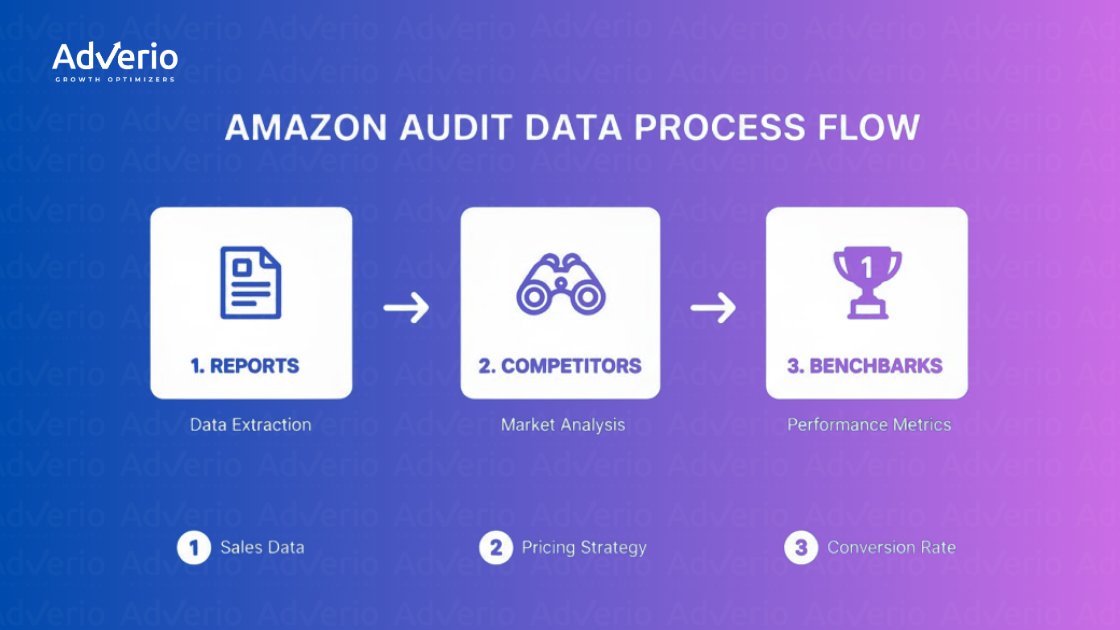
This structured approach separates a professional audit from a casual once-over. It forces you to build your strategy on a foundation of data, focusing your energy on the fixes that will move the needle.
Front-End Conversion Drivers
These on-page elements stare your customer in the face, directly influencing their decision to click and buy. The goal here is brutally simple: does your listing communicate value, answer questions, and build trust faster than your competitors?
-
Title Analysis: Does your title scream what the product is, its main benefit, and critical info like size or quantity? It’s a delicate balance between keyword relevance and human readability. “Premium Cotton Queen Sheet Set – 4 Piece, Cooling & Breathable” crushes “Sheets Bedding Queen Cotton Soft Best Sheets” every time.
-
Bullet Point Evaluation: Your bullets are your sales pitch. They must translate boring features into tangible benefits. Don’t just say, “Made with 100% long-staple cotton.” Instead, sell the outcome: “Experience Unmatched Softness & Durability with 100% Long-Staple Cotton.” Each bullet should answer a customer’s unspoken question.
-
Image Stack Review: Images are your most powerful conversion tool. Your main image has one job: be compliant, pristine, and on a pure white background. The rest of your images need to tell a visual story, showcasing features, lifestyle use-cases, scale, and what makes you different. If a customer can’t get their top three questions answered by your images alone, you’re failing.
-
A+ Content and Brand Story Assessment: A+ Content isn’t a junk drawer for more photos. It should guide the shopper through a compelling brand narrative, offer useful product comparisons, and tackle common objections. Is it scannable on mobile? A massive wall of text or poorly formatted modules hurts conversions more than having no A+ Content at all.
Back-End Health and Indexing Signals
What happens in the backend is as critical as what the customer sees. This is where you control how Amazon’s algorithm finds and categorizes your product. An error here is invisible to shoppers but devastating to your rank.
A systematic review of your backend is a core part of any serious Amazon listing optimization effort. This is why Amazon listing optimization isn’t cosmetic; it’s structural. Are you even showing up for the terms you think you are?
Use a reverse-ASIN tool to confirm your most critical keywords are indexed. If they aren’t, the culprit is almost always your backend search term fields or your product attributes.
Next, audit your product attributes—the “flat file.” This is where many brands stumble. A wrong product_type or a missing material An attribute can completely remove your listing from relevant filtered searches. Go through every field and ensure it’s accurate and complete. Listing a “t-shirt” under the “dress shirt” category makes it invisible to the right buyers.
A listing audit is like a vehicle inspection. The shiny paint (front-end) is important, but if the engine (back-end) is misfiring, you’re not going anywhere. Most brands only polish the paint.
Off-Page Performance Factors
Finally, a complete audit zooms out to the external levers influencing demand—where Amazon DSP management and retargeting strategies directly impact conversion rates and Buy Box competitiveness.
Your fulfillment method is paramount. Are you using FBA, FBM, or a hybrid model? Check your inventory levels and in-stock rates. Going out of stock, even for a day, crushes your sales velocity and tells the algorithm you’re unreliable.
Pricing competitiveness is another huge lever. How does your final price—including shipping—stack up against the top three competitors for your main keywords? If you’re priced significantly higher, your listing content and brand have to scream “premium” to justify it.
Lastly, scrutinize your variant structure. Are all your child ASINs (like different colors or sizes) properly grouped under a single parent? A fragmented variant family splits your sales history and reviews, diluting the ranking power of the entire product line.
Consolidating them is often a quick win that immediately boosts social proof and visibility.
Diagnosing Your Traffic and Conversion Leaks

A polished listing means nothing if nobody sees it. On the flip side, a flood of traffic is just wasted ad spend if shoppers don’t convert—which is exactly why Amazon PPC management needs to be tied to conversion, not just clicks. A real Amazon listing audit goes beyond on-page copy to find the actual leaks in your sales funnel—pinpointing exactly where you’re losing customers.
This is where you shift from guesswork to data-driven diagnosis. By zeroing in on a few critical metrics, you can build a clear story about your listing’s performance and figure out if your core problem is discoverability, relevance, or a weak value proposition.
Interpreting the Core Performance Metrics
Don’t get bogged down in spreadsheets. Just three core metrics will tell you 90% of what you need to know about your traffic and conversion health. The key is understanding how they play together.
-
Impressions & Share of Voice (SOV): This is your discoverability score. If your impressions are low, you’re not showing up in relevant search results. Your SOV tells you how much of the digital shelf you own for a specific keyword compared to your rivals. A low SOV is a flashing red light that your indexing or keyword strategy is broken.
-
Click-Through Rate (CTR): This is about relevance. You’re getting impressions, but are shoppers interested enough to click? A low CTR is a direct shot at your main image, title, price, or review count—the only things people see on the search results page. It’s screaming, “You’re not compelling enough.”
-
Unit Session Percentage (CVR): This is the ultimate test of your value proposition. Shoppers clicked, they landed on your page… but they didn’t buy. A low CVR points to a major disconnect between what your listing promised and what the detail page delivered. The problem is hiding in your bullet points, A+ Content, secondary images, or a competitor’s much better offer.
These metrics map directly to visibility, relevance, and conversion miss one, and the system breaks. Impressions are people walking past your store. CTR is how many stop to look in the window.
CVR is how many come inside and buy something. You need all three to win.
From Data to Diagnosis
These metrics aren’t just numbers; they’re diagnostic tools. They let you find the root cause of poor performance with surgical precision.
Isolating the issue is half the battle. If you see high impressions but a rock-bottom CTR, stop wasting time tweaking your A+ Content. The problem isn’t on your detail page; it’s your “curb appeal”—what shoppers see before they click.
Here’s how to map the symptoms to a diagnosis:
| Symptom | Likely Diagnosis | Where to Look First |
|---|---|---|
| Low Impressions | Discoverability Problem: Your listing is basically invisible. | Backend keywords, product categorization, indexing status. |
| High Impressions, Low CTR | Relevance Problem: Your offer isn’t compelling enough to click. | Main image, title, price point, review rating. |
| High CTR, Low CVR | Value Proposition Problem: You got the click but failed to close the deal. | A+ Content, bullet points, secondary images, competitor pricing. |
Using Amazon’s Tools to Find the Leak
Amazon’s Search Query Performance (SQP) dashboard is your best friend here. It directly links specific search terms to impressions, clicks, and sales, showing you exactly which keywords are bleeding cash.
Drill down into the ASIN-level view and hunt for queries that have high search volume but terrible performance. A keyword driving thousands of impressions but only a handful of clicks isn’t an opportunity; it’s a relevancy mismatch that’s dragging down your listing’s overall performance.
This granular analysis helps you build a precise action plan. You’ll stop wasting cycles optimizing A+ Content when the real problem is a non-compliant main image killing your CTR. By turning raw data into a clear narrative, you can focus your energy where it’ll make a difference.
Understanding these metrics is a crucial part of evaluating your overall Amazon Listing Quality Score and turning your audit into actionable profit.
Turning Your Audit Into an Action Plan
An Amazon listing audit is worthless if it becomes another spreadsheet that collects dust. The entire point is to turn those findings into a clear, prioritized action plan that drives results. This is where insights become ROI.
You can’t fix everything at once. The key is sorting every issue by its potential impact and the effort required to fix it. This is how you separate the quick wins that can boost performance in days from the bigger projects that build sustainable growth.
From Diagnosis to Dollars
Your first move is to sort every finding into a simple framework. This isn’t about making things complicated; it’s about getting brutally clear on what matters most. The classic Impact vs. Effort matrix is the most effective way to see what to tackle now, what to schedule, and what to put on the back burner.
-
Quick Wins (High Impact, Low Effort): Your immediate priorities. Think fixing suppressed listings, correcting a critical backend attribute that’s killing your indexing, or swapping out a main image that violates Amazon’s ToS. These fixes often take minutes but can unlock revenue overnight.
-
Major Projects (High Impact, High Effort): The game-changers that require more resources. This bucket includes a full A+ Content overhaul, a professional product photoshoot, or consolidating a messy variant family. You need to schedule these deliberately, as they have the power to fundamentally lift your conversion rates.
-
Fill-In Tasks (Low Impact, Low Effort): Minor tweaks you can knock out when you have a spare moment. Think refining a few backend search terms or rephrasing a bullet point. They add up, but they won’t sink your business if they have to wait.
-
Reconsider (Low Impact, High Effort): Anything that falls here should be questioned. If a task requires a massive investment of time or money but offers a tiny return, it’s probably not worth doing.
The goal isn’t just to make a to-do list; it’s to create a strategic sequence of actions. Front-load the tasks that stop the bleeding and unlock the most potential revenue first.
Structuring Your 30-Day Action Plan
Once your priorities are straight, build a tangible 30-day action plan. This roadmap keeps your team accountable and ensures you maintain momentum. A solid plan clearly outlines the task, the owner, the deadline, and the specific KPI you’ll be watching to measure success.
After diagnosing the problems, your roadmap will naturally involve implementing improvements. Many core principles for boosting product visibility apply across different platforms; you can learn general listing optimization tactics that are broadly useful.
However, for Amazon-specific changes, it’s critical to test your assumptions. You can learn more in our dedicated guide on the art of split-testing small tweaks that drive big results on Amazon.
Here’s a sample roadmap to structure your plan. It’s a simple way to keep everyone aligned and focused on what will move the needle over the next month.
Sample 30-Day Remediation Roadmap
| Timeline | Priority Level | Action Item | KPI to Monitor |
|---|---|---|---|
| Week 1 | High | Fix 5 stranded inventory ASINs by updating required attributes. | Stranded Inventory Units (Goal: 0) |
| Week 1 | High | Rewrite titles for top 3 ASINs to improve keyword relevance. | Organic Rank for Target Keywords |
| Week 2 | High | A/B test a new main image for the top-selling product. | Click-Through Rate (CTR) |
| Week 2 | Medium | Update backend search terms for the entire “Blue Widget” product line. | Indexed Keyword Count, Search Term Impressions |
| Week 3 | Medium | Add a comparison chart to A+ Content for the “Deluxe” model. | Unit Session Percentage (CVR) |
| Week 4 | Low | Respond to all unanswered customer questions from the last 60 days. | Customer Questions Count |
This structure turns a daunting list of issues into a manageable, week-by-week sprint. By the end of the 30 days, you won’t just have a “better” listing—you’ll have the data to prove it.
Common Questions About Amazon Listing Audits
An Amazon listing audit can feel like a moving target, especially when the platform itself is always changing. Here are straight answers to the most common questions we get from brands.
How Often Should I Run a Listing Audit?
This is not a “one and done” job. For most established brands, you should plan on a full, deep-dive audit quarterly. This pace is right for catching new problems, reacting to algorithm updates, or getting ahead of a new competitor before they do real damage.
But waiting a full 90 days to check on your hero products is too long. That’s why you also need a “mini-audit” or a quick health check as part of your weekly or bi-weekly routine. This should be a fast, focused look at:
-
Indexing status for your top 10-20 ASINs.
-
Suppression alerts or any other critical flags in Seller Central.
-
Buy Box percentage on your most profitable products.
-
Review velocity and any sudden shifts in your average rating.
This two-tiered system keeps you on top of the urgent stuff while carving out time for deeper strategic work.
What Are the Biggest Red Flags You Usually Find?
When we dig into an audit, a few problems show up more often than others. These are the profit leaks hiding in plain sight.
The most common red flags we uncover are:
-
Wrong product categorization, which makes your listings invisible when shoppers use filters.
-
Keyword indexing failures, where you’re not showing up for your most valuable, high-intent search terms.
-
Non-compliant main images that get your listing silently suppressed and kill your click-through rates.
-
Lazy A+ Content, especially the failure to use comparison charts, which are a powerhouse for boosting conversion.
Another huge one is a sudden drop in your Unit Session Percentage (your conversion rate). This almost always means a new competitor has crashed the party with a sharper price, a better offer, or more convincing content. It’s an immediate signal that you need to take action.
Can a Listing Audit Really Make a Difference in Sales?
Absolutely. A proper audit is one of the highest-ROI activities you can do because it systematically finds and plugs the holes sinking your visibility, conversion rates, and ad efficiency.
Think of it this way: fixing one suppressed ASIN with high sales velocity can instantly bring back thousands in lost revenue per day. Improving the conversion rate on a key product by just 1-2% can easily add tens of thousands to your bottom line over a year—all while making every dollar you spend on ads work harder. An audit draws a direct line from your on-page efforts to your P&L.
What Tools Are Actually Essential for an Audit?
A sharp eye and some manual digging are non-negotiable, but you can’t see the whole picture without the right tools. Just looking at the product page is like trying to diagnose an engine problem by staring at the car’s paint job.
Here’s the essential toolkit for a real audit:
-
Amazon’s Own Tools: You have to start with Brand Analytics and the Search Query Performance dashboard. This is the ground truth, straight from Amazon, on how customers find and interact with your products.
-
Third-Party Keyword Tools: You need a platform like Helium 10 or Jungle Scout for reverse-ASIN lookups, deep indexing checks, and spying on your competitors’ keyword strategies. They show you what your rivals are doing right.
-
Internal Dashboards: Your own sales and traffic reports from Seller Central are crucial. They give you the historical benchmarks you need to track whether your changes are actually moving the needle over time.
These tools don’t do the thinking for you, but they give you the raw data needed to make smart, profit-driven decisions instead of just guessing.
An audit tells you what’s broken. A profit system tells you what to fix first.
Adverio’s listing audits don’t stop at diagnostics; we tie every finding to revenue impact, priority, and execution.
Book Your ROI Forecast and see where your listings are silently bleeding profit.