



If a product line with real demand has stalled, the issue usually isn’t ads or creative; it’s how your catalog is structured. It’s a silent profit killer—a broken Amazon parenting strategy. Most brands treat variations as a back-office catalog task. That’s a mistake. The right approach transforms individual listings into an interconnected ecosystem that drives discovery, conversion, and profit. Anything less quietly erodes margin and suppresses scale.
Your Broken Amazon Parenting Strategy Is Costing You Money

Let’s cut to the chase. If you sell a t-shirt in five colors and three sizes, do you create 15 separate product pages? Or do you build one master listing where shoppers can toggle between every option? The second approach is the core of an effective Amazon parenting strategy. It’s not about being tidy; it’s a foundational piece of marketplace growth that hits your bottom line directly.
A sloppy approach doesn’t just look unprofessional—it actively sabotages your growth. Don’t believe it? Book Your ROI Forecast and we’ll show you the hidden profit leaks in your catalog.
Stop Thinking Like a Catalog Manager and Start Thinking Like a Growth Partner
Too many brands see product variations as an operational chore, not a strategic lever. That perspective is a massive mistake. The right strategy turns isolated product pages into a powerful, consolidated revenue surface that delivers huge wins:
- Consolidated Reviews: All customer reviews and ratings from every child product—the red shirt, the blue shirt, the green shirt—roll up to the parent listing. This creates immediate social proof that a standalone listing could never achieve.
- Simplified Customer Journey: Shoppers don’t have to back out of your product page to find the size or color they want. A seamless selection process cuts friction and directly boosts your conversion rate.
- Amplified Discoverability: The combined sales velocity from all variations sends powerful signals to Amazon’s A9 algorithm. This helps the entire product family rank higher for a broader set of keywords.
A well-executed parenting strategy isn’t about organizing products; it’s about engineering a better shopping experience that Amazon’s algorithm rewards. It’s the difference between showing a customer one puzzle piece versus the entire picture.
The Profit-First Framework
This guide cuts through the noise to deliver a profit-first framework for structuring your product families. We’ll show you how to move beyond basic attribute grouping and start making strategic parenting decisions that impact your conversion rates, average order value (AOV), and overall market share.
Catalog structure determines profit before ads ever scale.
Explore how Adverio approaches Amazon catalog optimization
Understanding when to group—or strategically separate—your products is fundamental. It requires a deep dive into how each item contributes to your catalog’s overall profitability. Our guide on SKU-level profit economics on Amazon provides a foundational look at how to evaluate product performance at this granular level.
By the end of this guide, you’ll see your catalog not as a liability, but as your sharpest competitive edge. It’s time to stop leaving money on the table.
Understanding Parent ASINs and Child Variations
Let’s ditch the confusing Amazon jargon. A Parent ASIN is the non-buyable master blueprint for a product line. It exists only to group its “children” together on a single detail page. You can’t add the blueprint for a “Men’s Performance T-Shirt” to your cart, but it’s the anchor that holds all the different sizes and colors together.
The buyable items are the Child ASINs—the specific products your customers actually purchase. These are the “Red, Large” or “Blue, Medium” versions of that t-shirt. Each has its own unique ASIN, SKU, and UPC, but they all live under the same parent umbrella.
The magic happens through the variation theme. This is the specific attribute Amazon uses to connect the children to the parent, like ‘SizeName-ColorName,’ ‘StyleName,’ or simply ‘ScentName.’ Choosing the right theme isn’t a minor detail; it’s a critical piece of a winning parenting strategy.
The Strategic Relationship Between Parent and Child
Grasping this hierarchy is step one, but real growth happens when you understand the strategy behind it. So many brands make the costly mistake of creating separate listings for every single color. This fractures customer reviews, splits your sales momentum, and forces shoppers to hunt all over Amazon just to find the option they want.
The goal isn’t just to group products; it’s to create a single, powerful retail destination. A proper parent-child structure consolidates sales velocity and social proof, sending strong positive signals to Amazon’s A9 algorithm.
A fragmented catalog is a hallmark of under-optimized Amazon catalog management. It dilutes your ranking power and creates a disjointed, frustrating customer experience. On the flip side, a unified product family streamlines the buying journey, boosts conversion rates, and maximizes the visibility of your entire product line. This is a core principle behind improving your overall Amazon Listing Quality Score, as it directly impacts usability and sales performance.
Visualizing the Impact
The difference between a strategic and a haphazard approach to parenting is stark. One builds momentum and drives profit, while the other creates inefficiencies and leaves money on the table.
This table breaks down the real-world business outcomes of getting it right versus getting it wrong.
Strategic Impact of Correct vs. Incorrect Parenting
| Strategic Area | Correct Parenting Strategy (Profit-First Approach) | Incorrect Parenting Strategy (Common Mistake) |
|---|---|---|
| Customer Reviews | Reviews for all variations are aggregated, creating strong social proof and boosting trust for new additions. | Each variation collects its own reviews, making new products look unproven and unpopular. |
| SEO & Discoverability | Combined sales velocity and traffic create a powerful ranking signal, improving visibility for all variations. | Sales history is fractured across multiple listings, weakening the ranking potential for the entire product line. |
| Customer Experience | Shoppers can easily compare options (size, color, style) on one page, reducing friction and increasing conversion. | Customers must navigate back to search results to find other options, increasing the chance they’ll click on a competitor. |
| PPC Advertising | Campaigns can be simplified, with performance data aggregated at the parent level for clearer insights. | Ad spend is diluted across multiple, competing listings, making it difficult to optimize bids and budgets effectively. |
Correct parenting isn’t just an organizational task—it’s a profit-protection machine that impacts every facet of your Amazon business.
A Profit-First Framework for Grouping or Splitting ASINs
Deciding whether to group a new seasonal color with your flagship product or launch it as a standalone listing isn’t just a cataloging choice—it’s a critical financial decision. Get it wrong, and you can cannibalize sales or kill launch momentum. Get it right, and you accelerate growth and maximize profitability.
Most brands operate on gut feelings, but a profit-first Amazon parenting strategy requires a data-driven framework. The answer to “group or split?” isn’t a simple yes or no; it depends entirely on your specific goals for that product.
This decision tree cuts through the noise. It boils the parent-child distinction down to a single, fundamental question: is the item something a customer can actually buy?
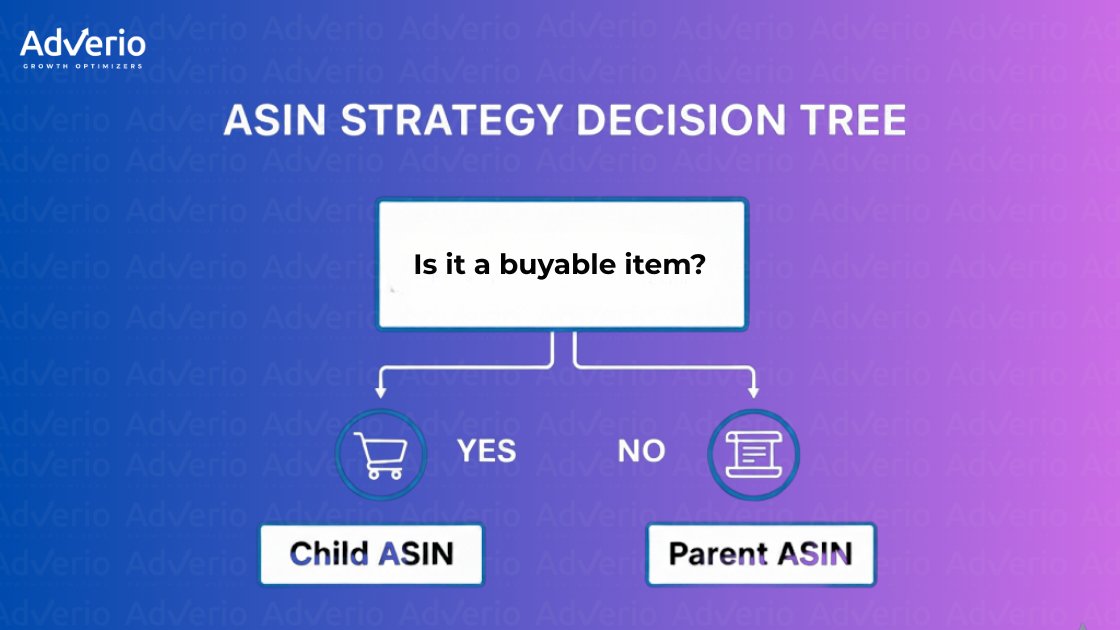
This visual clarifies that Parent ASINs are just organizational tools, while Child ASINs are the actual products people add to their carts. This distinction is the bedrock of any smart grouping decision.
When to Group ASINs
Grouping makes sense when your primary goal is to leverage existing momentum. Combining variations under a single parent is a powerful move designed to consolidate strength and give newer products a serious head start.
Consider grouping your ASINs when:
- You want to share review equity. Bundling a new, unproven variation with a high-performing “hero” ASIN allows the new product to instantly inherit the social proof of the established one. This is a classic launch acceleration tactic.
- The products share primary keywords. If customers use the same search terms to find both the existing product and the new variation (e.g., “queen size cotton sheets”), grouping them simplifies the shopping experience and reinforces your SEO authority for those terms.
- The price points are similar. Grouping products within a tight price range prevents sticker shock and helps customers make a simple choice based on attributes like color or size, not cost.
When to Split ASINs
Conversely, splitting ASINs is a defensive or offensive strategy. It’s about protecting brand perception, targeting different customer segments, or avoiding the drag of a poor performer. A standalone listing allows a product to build its own unique identity.
Consider splitting your ASINs when:
- There is a significant price difference. Grouping a premium $100 variant with a budget $20 option can create negative price anchoring. Customers may see the cheaper option as the “default,” hurting the conversion rate of your more profitable SKU. Exploring an Amazon anchor pricing strategy can help you determine the psychological impact of price points on your listings.
- Search intent is fundamentally different. If a new product solves a different problem or appeals to a completely different customer avatar, it deserves its own listing. Forcing it into an existing parentage can confuse the algorithm and muddy your keyword targeting.
- The “hero” ASIN has poor reviews. Tying a promising new product to a listing with a low star rating is a death sentence. Splitting it gives the new product a clean slate to build its own reputation without being dragged down by past performance issues.
The core question is always: Does this grouping decision make the customer’s choice easier and amplify my existing strengths, or does it create confusion and dilute my brand’s message? Stop thinking about what’s easier to manage and start thinking about what’s easier for the customer to buy.
By applying this strategic framework, you can turn your catalog from a source of complexity into a precisely engineered engine for profitable growth.
Executing Your Amazon Variation Strategy Step-By-Step
Theory is one thing, but execution is everything. A winning Amazon parenting strategy lives or dies in the operational details. This is the playbook for getting it right, whether you’re launching a new product family or cleaning up a legacy one. Success here comes down to the kind of tactical precision that prevents future headaches and sets your products up for maximum discoverability.
Establish a Bulletproof SKU Naming Convention
Your SKUs are the internal language of your business. A chaotic system is a recipe for operational nightmares. A clear, logical convention isn’t just nice to have; it’s your foundation for scale. Build a system that actually means something.
- Structure: Create a consistent format that tells a story, like
[PRODUCT-LINE]_[STYLE]_[COLOR]_[SIZE]. A real-world example would beTSHIRT-CREW-BLK-LG. - Parent SKU Logic: The parent SKU needs to be instantly identifiable. A simple method is to use the base of the child SKUs with a
-PARENTsuffix, such asTSHIRT-CREW-PARENT. - Consistency is Key: Once you define your system, stick to it religiously. This discipline pays off massively as your catalog grows.
Select the Optimal Variation Theme
The variation theme is how you tell Amazon how your products are related (e.g., SizeName-ColorName, StyleName, ScentName). Picking the right one is critical because it dictates how customers can filter and select options on your product detail page. Once you set it, it can be an absolute pain to change.
Think like your customer. What are the top one or two things they care about when making a decision? If you sell shoes,
SizeName-ColorNameis a no-brainer. If you sell candles,ScentNameis probably the only thing that matters. Overcomplicating this adds friction and kills conversion.
Choose the theme that mirrors the real-world decision-making process for your product. Don’t force a two-attribute theme like Size-Scent if only one is truly relevant.
Craft Harmonized Parent and Child Titles
Your parent and child titles have to work together perfectly as part of a broader Amazon listing optimization strategy. They have distinct jobs, and you need to optimize them accordingly.
- Parent Title: This title should be broad, capturing the core, high-volume keywords for the entire product family. It describes the product at a high level without getting into specific variation details. A strong parent title might be: “Men’s Moisture-Wicking Performance Crewneck T-Shirt.”
- Child Title: The child title inherits from the parent but must also include the specific variation attributes that make it unique. For example: “Men’s Moisture-Wicking Performance Crewneck T-Shirt, Large, Royal Blue.”
This structure ensures the parent listing ranks for broad terms while each child ASIN is indexed for specific, long-tail searches. This methodical approach is a key part of an effective Amazon backend keyword strategy, aligning your entire listing for maximum search relevance.
Nail Your Imagery Strategy
Imagery is where many variation strategies fall apart. Each child ASIN needs its own set of high-quality images. But the parent’s main image has a special job: it has to showcase the range of choices available.
A great main image for the parent might be a group shot showing all the available colors, or a lifestyle shot featuring a few different variations. This immediately signals to the shopper that they have options, encouraging them to click and explore. For the individual child ASINs, make sure the primary image features only that specific variation on a clean, white background. As you execute your strategy, mastering product photography for your listings is paramount for creating clarity and driving conversions.
This operational playbook isn’t just about organizing your catalog. It’s about building a robust foundation that supports scalable, profitable growth.
How Variations Impact Your SEO, Ads, and Buy Box

Your Amazon parenting strategy is the central nervous system connecting every critical performance lever on the platform: your organic rank, your ad performance, and your ability to win sales. When variations are mismanaged, these systems work against each other. SEO, advertising, and conversion optimization become siloed efforts that bleed profit. A smart, unified approach turns them into a single, powerful growth engine.
Many brands fall into Optimization Myopia—obsessing over ACoS in one dashboard while ignoring the foundational variation issues killing their performance elsewhere. A cohesive parenting strategy doesn’t just tidy up your listings; it fundamentally strengthens your entire Amazon operation.
The SEO Multiplier Effect
A proper parent-child structure is one of the most potent—and overlooked—SEO advantages you have on Amazon. When you group variations correctly, you consolidate all the performance signals the A9 algorithm loves.
- Aggregated Sales Velocity: Every sale of a child ASIN—whether it’s the red shirt or the blue one—contributes to the sales history of the parent listing. This concentrated velocity signals to Amazon that your product is a top performer, which directly boosts its organic rank.
- Consolidated Reviews & Questions: Social proof is currency on Amazon. All the reviews, ratings, and Q&As from every child variation roll up to the parent. A shopper looking at a brand-new colorway instantly sees the trust and history built by the entire product family.
Think of it as a flywheel. More sales and reviews lead to better rankings, which drives more traffic, which generates even more sales and reviews. A fragmented catalog breaks this momentum before it can start.
Simplified and Smarter Advertising
Running PPC campaigns for a disorganized catalog is like trying to conduct an orchestra where every musician is playing a different song. It’s chaotic, inefficient, and expensive. Strategic parenting brings clarity to Amazon PPC management.
When you structure campaigns around Parent ASINs, you unlock clearer data and simpler management. You can analyze performance for the entire product family, see which variations are driving the most profitable growth, and allocate your budget with precision.
This immediately stops your own child ASINs from bidding against each other for the same keywords—a common mistake that does nothing but drive up your ad costs. It allows you to build campaigns around a single, powerful asset, turning ad spend into a predictable investment rather than a scattered expense.
Dominating the Buy Box
The Buy Box is where over 80% of Amazon sales happen. Your parenting strategy has a direct impact on your ability to win and hold it.
When you create separate listings for every color and size, you inadvertently force your own products to compete against each other for that coveted spot.
This internal competition can confuse Amazon’s algorithm, potentially splitting Buy Box ownership between your own child ASINs or creating an opening for a reseller to steal sales. A unified listing under a single parent SKU eliminates this self-sabotage.
By presenting a single, cohesive offer, you signal to Amazon that you are the authoritative seller, dramatically increasing your win rate. This is a foundational element of a strong defense, and our guide on a proactive Buy Box strategy for Amazon sellers dives deeper into how to protect this critical real estate. Ultimately, a clean parenting strategy is a core part of knowing how to improve ecommerce conversion rate by making it easier for customers to click “Add to Cart.”
Common Parenting Pitfalls and How to Fix Them
Even sharp brands make costly mistakes with their Amazon parenting strategy. We’ve seen them all—from sloppy variation themes that kill discoverability to outright “variation abuse” that puts an account on the chopping block. These are strategic blunders that bleed profit and hand market share to your competitors.
Most of these errors happen when brands treat variations as an afterthought. Think of this as your emergency response plan for the most common—and damaging—parenting pitfalls we see every day.
Diagnosing Variation Abuse
This is the cardinal sin of Amazon parenting. It’s when a seller tries to group completely different products together just to hijack the sales velocity or review count of a star ASIN. Think launching a new phone case by attaching it to a best-selling power bank. It’s a short-sighted tactic that violates Amazon’s Terms of Service and is a fast track to getting your listing suppressed or your account suspended.
The Fix: Don’t do it. Ever. The rule is simple: if the products are not legitimate variations of one another (differing only by attributes like size, color, scent, or style), they need separate listings. If you’ve inherited a catalog with this problem, your only move is to dismantle the parentage immediately. Use a flat file upload to sever the relationship. Protect your account before Amazon forces your hand.
Mismatched Attributes and Broken Listings
One of the most frustrating pitfalls is a broken parent-child relationship. This almost always happens when a child ASIN’s attributes (like ‘Color’ or ‘Size’) don’t perfectly match the parent’s declared variation theme. For instance, if the parent theme is SizeName-ColorName, but a child ASIN only has a ‘SizeName’ value filled in, the connection can snap.
This is how child ASINs become “orphaned,” appearing as standalone listings. The result is a fractured customer experience, diluted review counts, and weakened SEO.
The Fix: A flat file is your best friend here. Don’t bother with the Seller Central interface.
- Download a Category-Specific Template: Grab the inventory file for your product’s category.
- Run a ‘Partial Update’: Fill out the essential columns for both the parent and all child ASINs. Make sure every single child has a value for each attribute defined in the parent’s
variation_themecolumn. - Re-establish the Link: Double-check that the parent SKU is correctly entered in the
parent_skucolumn for every child. Uploading this file will force Amazon’s system to re-sync the relationship.
When your listings break, don’t rely on the Seller Central interface. It’s clunky and often fails. Mastering flat file uploads is a non-negotiable skill for any serious brand managing a complex catalog on Amazon.
The Wrong Variation Theme
Choosing the wrong variation theme is like building a house on a shaky foundation. If you sell t-shirts and choose only ‘ColorName’ as your theme, you’ve made it impossible for customers to select a size. This adds massive friction to the buying process and kills conversion.
Worse, once a parent ASIN is created with a variation theme, it cannot be changed.
The Fix: You have to tear it down and start over. This involves deleting the existing parent ASIN—this won’t delete the child ASINs, they’ll just become standalone listings temporarily. Then, create a brand new parent with the correct variation theme. Finally, use a flat file to assign all the existing child ASINs to their new parent. It’s a painful process, which is why getting it right from the beginning is critical.
Your Burning Questions About Amazon Parenting, Answered
Got questions about Amazon parenting? You’re not alone. Here are the straight answers to the most common questions we get from brands trying to wrangle their product catalogs.
How many Parent ASINs should a brand actually have?
It’s almost always better to have fewer, more consolidated Parent ASINs. Full stop. The entire point of an Amazon parenting strategy is to group genuinely similar products—like a t-shirt in different sizes and colors—under one roof. This single move pools all their review scores and sales history into one powerhouse listing. Creating a bunch of different parent ASINs for similar items just splits your social proof and sales velocity, killing your discoverability.
How do parent/child listings impact discoverability?
A solid parent-child structure gives your discoverability a massive boost. When you group variations, all the sales velocity, customer reviews, and Q&A from every single Child ASIN get rolled up to the parent level. In the eyes of Amazon’s A9 algorithm, this creates an incredibly strong, authoritative signal. The result? Your consolidated listing is far more likely to rank higher for a wider range of keywords than any single, standalone product ever could.
What’s the best way to structure bundles on Amazon?
Bundles are not variations and should never be treated as such. A bundle (e.g., a shampoo and conditioner set) is a unique product with its own UPC and should have its own standalone ASIN. Forcing a bundle into a parent-child relationship with its individual components is a violation of Amazon’s policies and will lead to listing suppression. Create a distinct listing that clearly communicates the value of the bundle.
How can I add a variation to an existing Amazon listing?
Yes, and you absolutely should. Adding a new child variation to an existing Parent ASIN is a killer strategy for launching new colors, sizes, or styles. By doing this, your new product instantly borrows the parent’s hard-won sales history and review count. You can do this in Seller Central by editing the parent listing, but for brands with even slightly complex catalogs, using a flat file inventory upload is a much safer and more reliable method.
If your catalog is fragmented, your growth is capped, no matter how much you spend on ads. Adverio builds profit-first frameworks that turn your product variations into a competitive advantage.
Book Your ROI Forecast → See where your catalog is leaking profit.