



If your growth on Amazon has stalled, the problem isn’t just about sales—it’s buried deep in your catalog.
Underperforming SKUs quietly drain profit through wasted ad spend, rising storage fees, and declining visibility, often without showing up in surface-level reports. This isn’t just about a few slow-moving items; it’s a systemic issue where a handful of winners are forced to carry the dead weight of a bloated, unprofitable catalog.

The True Cost of a Bloated Catalog
We’re going to cut through the noise and show you exactly how to stop the bleeding. Forget misleading metrics like ACoS that only tell part of the story. This guide gives you a complete, multi-faceted framework for diagnosing the health of your catalog through a profit-first lens.
It’s time to make the tough, data-driven decisions that separate market leaders from everyone else. This starts with understanding the true financial impact of each product you sell—a concept at the heart of mastering your Amazon SKU-level profitability.
In the cutthroat Amazon marketplace, where over 600 million SKUs are fighting for attention, sales velocity is a non-negotiable first step. Amazon’s algorithm rewards high-velocity items, meaning SKUs with low velocity quickly fade into obscurity.
Sellers who aren’t tracking week-over-week velocity drops are flying blind. In practice, even short-term drops in sales velocity often lead to rapid declines in organic visibility and Buy Box eligibility. That’s a fast track to losing the Buy Box entirely.
Key Indicators of Underperforming Amazon SKUs
Before you start a deep-dive analysis, you need to know what you’re looking for. The table below is a quick-glance guide to the core metrics that scream “problem SKU.” Use it to quickly spot potential issues across your catalog and triage your efforts.
| Metric | What It Tells You | Red Flag Threshold (Example) |
|---|---|---|
| Contribution Margin | The actual profit generated per unit after all variable costs are deducted. | Below 15% or negative |
| TACoS (Total ACoS) | The relationship between total ad spend and total revenue, revealing overall ad efficiency. | Steadily increasing past 25% for a mature product |
| Unit Session Percentage | The conversion rate of your listing, showing how many visitors become buyers. | Below 5% or significantly lower than category average |
| 180+ Day Aged Inventory | The volume of stock sitting in FBA for over six months, incurring costly fees. | More than 10% of total units for that SKU |
| Return Rate | The percentage of units returned by customers, indicating product or listing issues. | Exceeds 8% in non-apparel categories |
If you see a SKU trip one of these red flags, it’s a clear signal to investigate further. A single bad metric might be explainable, but when two or more of these start to trend in the wrong direction, you’ve likely found a zombie that needs to be dealt with.
Build Your SKU Performance Command Center
Table of Contents
You can’t fix what you can’t see or what you’re not measuring through a profit lens. Trying to manage your catalog by jumping between fragmented, siloed reports in Seller Central is a recipe for missed opportunities and hidden profit drains.
It’s about creating a single source of truth that ties performance directly to profitability. This is where a unified SKU performance dashboard becomes your command center for making sharp, profit-driven decisions without toggling between Business Reports, the advertising console, and inventory pages.

Consolidating Your Core Metrics
To get a true 360-degree view of SKU health, you have to pull specific data points from all over Amazon’s ecosystem and get them into one place, whether that’s a sophisticated spreadsheet or a proper BI tool. This approach replaces guesswork with a clear, undeniable picture of what’s actually happening.
Your command center needs these non-negotiable metrics at a minimum:
-
From Business Reports: Track Sessions (your traffic), Unit Session Percentage (your conversion rate), and Buy Box Percentage. A sudden drop in any of these is an immediate red flag.
-
From Advertising Reports: You’ll need Ad Spend, Ad Sales, and Clicks. This is the only way to calculate your true advertising efficiency at the individual SKU level.
-
From Inventory Reports: Keep an eye on your Sell-Through Rate, Days of Supply, and IPI Score. These numbers show you how hard your capital is working and give you an early warning before long-term storage fees start piling up.
Structuring Your Dashboard for Action
Once you have the raw data, the magic is in how you structure it. Create columns for each metric, with every row representing a single, unique SKU. This setup is what lets you calculate powerful blended KPIs that tell the whole story.
The goal is to move beyond isolated metrics. A high sales volume means nothing if the contribution margin is negative after factoring in returns, storage fees, and a sky-high TACoS.
For example, by combining your advertising data with your total sales figures, you can calculate TACoS (Total Advertising Cost of Sales). This reveals the real impact of your ad spend on overall revenue, preventing the all-too-common mistake of pouring money into an unprofitable product. Likewise, pulling in your landed cost allows you to calculate the actual Contribution Margin for every single unit you sell.
Here’s a simplified look at how this dashboard might be structured:
| SKU/ASIN | Sales Velocity (Last 30 Days) | Sessions (Last 30 Days) | Unit Session % | Buy Box % | TACoS | Contribution Margin | Sell-Through Rate |
|---|---|---|---|---|---|---|---|
| SKU-001 | 500 units | 5,000 | 10% | 95% | 12% | $15.50 | 2.5 |
| SKU-002 | 20 units | 800 | 2.5% | 40% | 45% | -$2.10 | 0.1 |
| SKU-003 | 150 units | 3,000 | 5% | 88% | 20% | $5.75 | 1.8 |
With this single view, SKU-002 jumps off the page as a “zombie.” It has poor traffic, a terrible conversion rate, weak Buy Box ownership, and is actively losing money on every sale. This is exactly the kind of insight that gets lost when you’re only looking at a campaign-level ACoS report.
Building this command center is the critical first step. But for brands with large catalogs, using sophisticated business intelligence for e-commerce is what truly unlocks scalable, profit-driven growth.
Look Beyond ACoS to Find True Profit Drains
Focusing solely on sales volume or ACoS is a classic case of Optimization Myopia. It’s the trap of celebrating surface-level wins like low ACoS while profit quietly erodes elsewhere. True performance isn’t measured in revenue or ad efficiency alone—it’s measured in profit.
To find the SKUs that are actually holding you back, you have to dig deeper into the financial and operational metrics that reveal a product’s real contribution to your bottom line. An attractive ACoS means nothing if the SKU is a profit drain everywhere else.
Go Deeper Than Surface Metrics
The first step is to shift your focus from advertising efficiency to overall business health. This means prioritizing metrics that connect ad spend and operational costs to total sales and, ultimately, profit.
These are the KPIs that expose the truth:
-
Contribution Margin per Unit: This is the absolute bedrock of SKU analysis. It’s the money you make on a single unit after all variable costs—landed cost, FBA fees, referral fees, and ad spend—are subtracted. A SKU with a low or negative contribution margin is a liability, no matter how many units it sells.
-
TACoS (Total Advertising Cost of Sales): This metric gauges your ad efficiency against total sales, not just ad-attributed sales. Calculated as
(Total Ad Spend / Total Sales) x 100, it shows you whether your advertising is creating a halo effect and lifting organic rank or just propping up a product that can’t stand on its own. -
Return Rate: This is a notorious and often overlooked profit killer. A high return rate doesn’t just mean lost sales; it means eating the cost of processing, potential unsellable inventory, and negative customer sentiment that can damage your listing’s ranking over time.
A low ACoS can easily mask an unprofitable SKU. If your return rate is 15% and your contribution margin is 12%, you are literally paying customers to take your product. You won’t see that in your ad console.
Set Dynamic, Intelligent Benchmarks
Static thresholds don’t work in a dynamic marketplace. The “right” TACoS or contribution margin for a SKU depends entirely on its context, category, and place in the product lifecycle. A one-size-fits-all approach will lead you to kill promising new products or prop up dying ones.
Your benchmarks must be fluid. For instance, a brand-new launch might justify a TACoS of 40% or higher for the first 90 days. During this phase, you are investing in visibility, ranking, and review generation. However, a mature, established SKU should be operating at a much leaner TACoS, typically under 15%, as organic sales should carry most of the weight.
Similarly, your pricing strategy directly impacts profitability. A premium price point can absorb higher advertising costs, but it might also increase customer expectations and, consequently, your return rate. Continuously refining your approach with a solid Amazon anchor pricing strategy is crucial for maintaining healthy margins.
Automate Analysis to Uncover Hidden Drains
Manually calculating these metrics across a catalog of hundreds or thousands of SKUs is not just tedious—it’s impossible to do effectively at scale. This is where automated systems become a non-negotiable part of your growth stack.
Adverio’s Profit Pulse System was built to automate SKU-level profitability analysis across ads, fees, inventory, and returns.
This system flags products that look healthy on paper but are actually bleeding you dry. It might identify a best-selling SKU whose high return rate and escalating storage fees have pushed its contribution margin into the negative. Without this deep, automated analysis, that “winner” would continue to drain resources, pulling capital and focus away from your truly profitable products. This is how you move from reactive problem-solving to proactive profit optimization.
Is It a Traffic or a Conversion Problem?
An underperforming SKU is almost always a victim of one of two things. Either not enough people are seeing it (a traffic problem), or the people who do see it aren’t buying (a conversion problem). Misdiagnosing this is like putting a bandage on a broken bone—it’s a total waste of time and money.
Stop throwing ad spend at a listing with a rock-bottom conversion rate. And for goodness sake, stop A/B testing images on a product nobody can even find. You have to know exactly which fire you’re fighting before you can put it out.
Diagnose Traffic Gaps with Precision
Before you even think about conversion, you have to be absolutely sure your product is actually visible to your target audience. If your sessions are low, the listing is effectively invisible. The game here is to figure out why your traffic is in the gutter.
Your first stop should be Amazon’s Search Query Performance (SQP) reports. This data is an absolute goldmine for diagnosing traffic issues. It tells you exactly which search terms your product is appearing for, its impression share, and its click-through rate.
A few red flags to hunt for in your SQP data:
-
Low Impression Share: If your impression share for high-volume, super-relevant keywords is in the single digits, it means your competitors own the search results page. Your SKU isn’t ranking organically or being shown in ads enough to even compete.
-
Irrelevant Keyword Impressions: Are you getting impressions for search terms that have nothing to do with your product? This screams that there’s a problem with your listing’s backend keywords or ad targeting. You’re confusing Amazon’s algorithm and wasting your visibility on the wrong shoppers.
-
High Impressions, Low Clicks: This is the classic sign that your main image, title, or price is failing to capture attention. Shoppers see your product, but they scroll right past it. It’s a weak first impression, plain and simple.
Beyond SQP, you need to dig into your Business Reports. Look at Sessions and Page Views at the individual ASIN level. A consistent downward trend or stubbornly low numbers confirm you have a traffic problem that needs immediate attention.
Uncover the Root of Conversion Failures
If the data shows your SKU is getting a healthy number of sessions but still isn’t selling, you’ve got a conversion problem. The issue is happening on the product detail page itself, where conversion friction kills momentum.
The main metric to dissect here is the Unit Session Percentage—that’s Amazon’s term for your conversion rate.
A “good” conversion rate is always relative, but if a SKU is converting at 5% while the rest of your catalog averages 15%, you’ve found a major leak. The listing is failing to convince shoppers to click “Add to Cart.”
To figure out why, you have to go beyond the numbers and look at the qualitative data. This is where you put on your detective hat.
Start by digging into your customer reviews and return reasons. Are customers constantly complaining about the same thing? Maybe the color isn’t what they expected, the sizing is off, or the product material feels cheap. The “Voice of the Customer” dashboard in Seller Central is your best friend here, as it consolidates these complaints and flags specific negative experiences.
A high return rate citing “inaccurate website description” is a direct indictment of your listing. It’s a clear signal that your copy, bullets, or images are setting expectations that the product simply can’t meet. Fixing these issues is a fundamental part of a strong Amazon listing optimization strategy that directly impacts your bottom line.
By bucketing your underperforming SKUs into these two distinct categories—traffic vs. conversion—you can stop guessing and start applying the right fix. This targeted approach is the only way to systematically turn your catalog’s weakest links into profitable assets.
Create Your SKU Remediation Playbook
Spotting an underperforming SKU is just the first lap. Now you need a structured plan to either fix it or cut it loose before it drags your profitability down. This is where you shift from diagnosis to action, creating a clear decision-making framework that tells you exactly what to do next.
Without a playbook, brands get stuck in a reactive cycle—tweaking a price here, boosting a bid there—with no real goal or timeline. A structured approach turns chaotic catalog management into a strategic growth lever, ensuring every move you make is deliberate, measurable, and smart.
This decision tree shows you the first critical fork in the road when diagnosing a problem SKU: is it a traffic problem or a conversion problem?
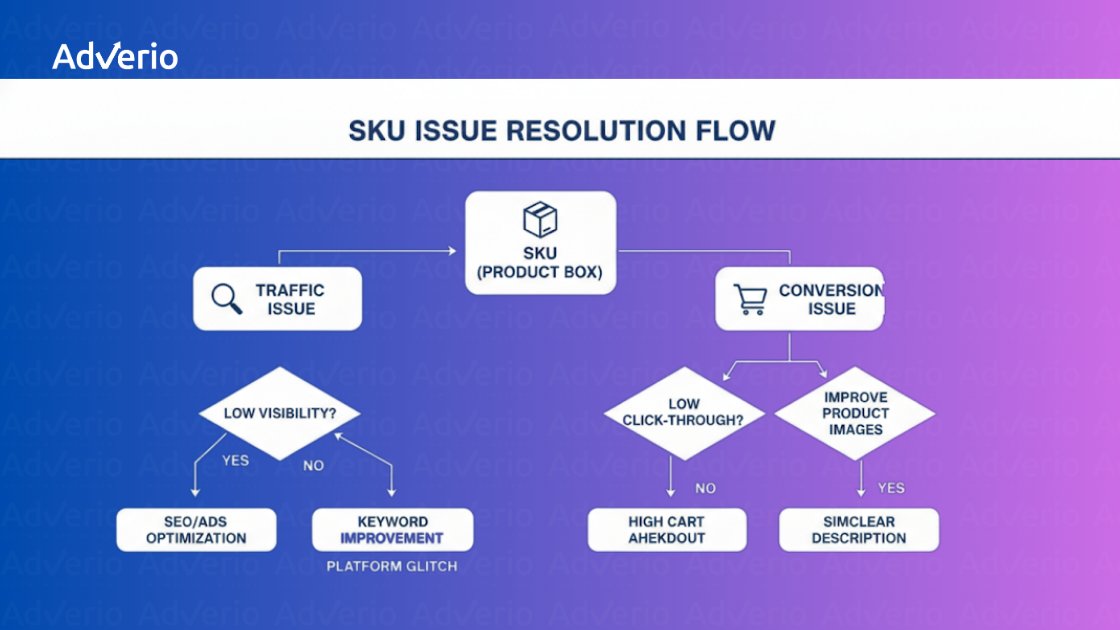
This flowchart simplifies the process by forcing you to pick one of two primary paths, which stops you from wasting time and money on the wrong solution. Once you’ve flagged an underperformer, the next step is to build a strategic plan to turn it around, focusing on actionable steps that demonstrate how to increase Amazon sales.
Define Your Remediation Tactics
Your playbook should be a menu of specific, pre-defined actions you can deploy based on the SKU’s diagnosis. This isn’t about reinventing the wheel every time; it’s about having a set of proven tactics ready to go.
Here are a few common remediation tactics we use:
-
SKU Resurrection: This is Adverio’s process for a full relaunch. It involves a complete overhaul of the listing—new creative, refreshed A+ content, and optimized copy—paired with an aggressive, targeted PPC execution to restore velocity and rank.
-
Strategic Bundling: Pair a low-velocity SKU with a high-performing, complementary product. This can boost the average order value (AOV) and move stagnant inventory while introducing the weaker product to a much larger audience.
-
Price and Promotion Adjustment: If you have the margin, run a limited-time promotion or coupon to spike sales velocity. This can kickstart the algorithm’s favor and is a key lever in the art of split testing small tweaks that drive big results on Amazon.
-
Liquidation: For the true “zombie” SKUs that are just draining capital with no hope of recovery, liquidation is the smartest move. This frees up cash and, just as importantly, improves your IPI score by clearing out that aged inventory.
The table below gives you a clear framework for matching the right action to the right problem. Think of it as your cheat sheet for deciding what to do next.
SKU Remediation Action Plan
| Problem Identified | Potential Cause | Primary Action | Secondary Action |
|---|---|---|---|
| Low Sessions | Poor organic rank, low ad visibility, not indexed for key terms | SKU Resurrection: Overhaul copy and creative, launch aggressive PPC campaigns on high-volume keywords. | Check for indexing issues using reverse ASIN lookup. |
| Low Conversion Rate | Negative reviews, poor quality images, high price, long delivery time | Content Refresh & Review Management: Update main image, A+ content, and actively address negative reviews. | A/B test pricing and coupons. |
| High TACoS/ACoS | Inefficient ad spend, low ad conversion rate, bidding on irrelevant keywords | Ad Campaign Audit: Pause low-performing keywords, refine targeting, and optimize ad creative. | Review product page for conversion blockers. |
| Stagnant Inventory | Low demand, poor visibility, part of a declining product category | Strategic Bundling or Promotion: Bundle with a hero SKU or run a steep, limited-time discount to move units. | Liquidation if other tactics fail. |
By using this table, you can quickly move from identifying a problem to implementing a targeted solution, making your response faster and far more effective.
Build the Probationary Plan
Once you’ve picked a tactic, the SKU goes on probation. This calls for a simple but non-negotiable plan that outlines what you’re going to do, how you’ll measure success, and when you’ll make the final call.
Your plan for each probationary SKU should include:
-
The Diagnosis: A one-sentence summary (e.g., “Low conversion rate due to poor review sentiment”).
-
The Action: The chosen tactic (e.g., “SKU Resurrection focusing on new main image and A+ content”).
-
The KPIs: Define what success looks like in numbers (e.g., “Increase Unit Session Percentage from 4% to 8%“).
-
The Timeline: Set clear checkpoints (e.g., “Review progress at 30, 60, and 90 days“).
A probationary plan removes emotion from the equation. If a SKU fails to meet its targets by the 90-day mark, the data has made the decision for you. It’s time to cut it loose.
By tracking these probationary SKUs with rigor, you create a feedback loop that constantly refines your catalog. You’ll learn which revival tactics work best for your products and which SKUs are simply not worth the effort. This proactive system stops profit leaks before they become catastrophic and ensures your catalog is a finely tuned engine for growth, not a warehouse for underperformers.
Ready to Turn Your Catalog Into a Real Growth Engine?
Let’s be honest. Trying to fix underperforming SKUs across a massive catalog feels like a never-ending game of whack-a-mole, even for the sharpest teams. It demands a level of data-crunching and strategic insight that most generic agencies and black-box tech platforms just can’t deliver. Relying on Seller Central alone is like trying to perform surgery with a butter knife—you know you’re missing the precision tools needed for the job.
At Adverio, we don’t just manage your ads. We plug in as your strategic financial partners, completely re-engineering your marketplace operation for profit-first growth. We throw out the surface-level metrics and go way deeper.
Your Strategic Financial Partner, Not Just Another Agency
Our proprietary Growth Cultivator framework and BI platform are built to cut through the noise and give you absolute clarity. We run deep diagnostics—like our Brand Drain Reversal analysis—to find and plug the hidden profit leaks that are quietly eating away at your margins. This isn’t about guesswork; it’s about surgical precision.
We use our proven SKU Resurrection process to revive those valuable assets that others would write off as dead weight. It’s a data-driven approach that pinpoints high-potential SKUs and then executes a full-funnel strategy to bring them back to profitability and reclaim their spot in the market.
Stop letting zombie SKUs dictate your growth ceiling. Your catalog is packed with locked-in profit potential, but you need the right partner and the right tools to unleash it. This isn’t just about spotting a few weak products; it’s about turning your entire catalog into a predictable, scalable growth engine.
It’s time to shake things up and stop settling for incremental gains and plateaued growth.
Ready to uncover where profit is leaking and how to reclaim it? Book Your ROI Forecast today and let us show you what’s possible when you work with a team that treats your business like it’s our own.
A Few Common Questions, Answered
How Often Should I Analyze My Catalog for Underperforming SKUs?
For brands with big catalogs (250+ SKUs), a full-catalog profitability review is non-negotiable every single month. Your key velocity and advertising metrics, however, need a weekly check-in.
This rhythm lets you spot negative trends—like a sudden drop in Buy Box percentage or a TACoS spike—before they can do any real damage to your bottom line or IPI score. And if you’re a seasonal brand, you absolutely must do a deeper dive 60-90 days before your peak season kicks off. You need to know the catalog is primed and ready to go.
What Is a Good Benchmark for Conversion Rate on Amazon?
Honestly, a “good” conversion rate (or Unit Session Percentage) varies wildly by category. Stop chasing a universal number. While you’ll often hear that an average rate between 10-15% is healthy, it’s a deceptive and often useless benchmark.
High-consideration products might convert much lower (5-8%), while cheap, consumable items can easily clear 20%. The only benchmark that truly matters is the one set by your direct competitors and your own historical performance. If a SKU’s conversion rate is tanking compared to your account average, it’s a glaring red flag that the listing page is broken.
At What Point Should I Liquidate a SKU Instead of Fixing It?
The decision to pull the plug and liquidate has to be cold and driven by data, not emotion. You cut a SKU loose when it starts checking several of these boxes:
-
It’s been a dud for a while: We’re talking consistently low sales velocity and a poor sell-through rate for over 90 days with zero signs of life.
-
It’s actively losing you money: After you factor in all the costs—storage fees, ad spend, returns—the SKU has a negative contribution margin. Every sale is a loss.
-
You’ve tried to save it and failed: Your attempts to revive it through listing optimization and targeted advertising (SKU Resurrection) haven’t produced a positive ROI.
-
Your capital is trapped: The cash tied up in that dead inventory could be immediately put to work scaling a proven winner and generating a much higher return.
If the numbers show it’s a drain, the debate is over. Cut your losses, liquidate the inventory to improve your IPI score, and reinvest that capital where it will actually drive growth. It’s a strategic retreat, not a failure.
Stop letting zombie SKUs dictate your growth ceiling. At Adverio, we turn catalog management from a reactive chore into a strategic growth driver.
Book Your ROI Forecast and let us show you the hidden profit potential locked in your catalog.