



Table of Contents
The three levers that decide whether a shopper clicks your listing or scrolls past it, and how to test them without guessing.
Every other number in your account depends on one you barely look at. Amazon CTR optimization is the difference between a listing that earns the traffic Amazon sends it and one that quietly bleeds impressions to the competitor in the next slot. You have about two seconds in the search grid. The shopper decides on three things before they ever reach your page.
If you run a $3M-plus catalog, low click-through isn’t a creative problem; it’s a math problem. A weak main image, a price that reads wrong against the grid, or a review block that doesn’t clear the trust bar all cap your traffic before conversion even gets a turn. This piece covers the three levers that move CTR, how to test them properly inside Amazon’s own tools, and where click-through sits in the sequence that actually drives profit.
One thing up front: CTR is a diagnostic, not a goal. A higher click-through rate on a listing that can’t convert just means you’re paying to send more people to a page that loses them.
At a Glance
- CTR in the search grid is decided by three things: your main image, your price relative to nearby offers, and your review signal (rating plus count).
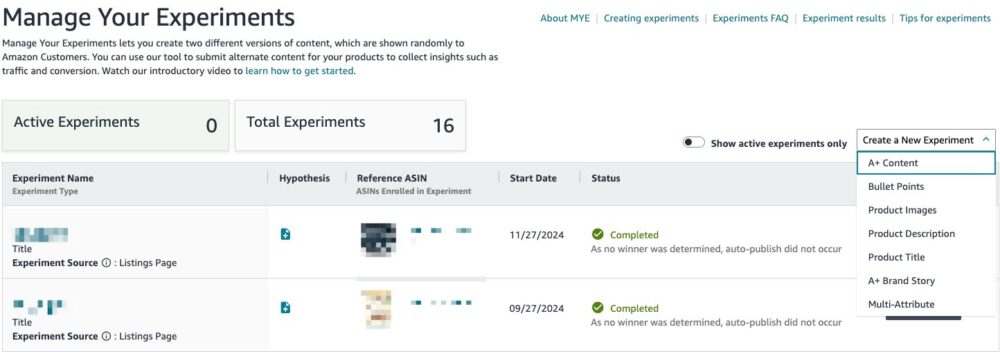
- Test the main image with Amazon’s Manage Your Experiments. It A/B tests images, titles, bullets, and A+ Content on live traffic, and it’s free for Brand Registered sellers.
- You cannot A/B test price on Amazon. Every shopper sees the same price at once. Use Automate Pricing and the Pricing Health dashboard to stay Featured Offer eligible instead.
- Reviews gate the click. Below the category trust bar, no image or price fixes a rating problem.
- CTR is upstream of conversion but downstream of nothing. Fix it first, then make sure the page it feeds can actually close.
Quick Answer: What Drives Amazon CTR?
Click-through rate in Amazon search is driven mainly by three elements a shopper can see in the grid before clicking: the main product image, the price shown against surrounding offers, and the star rating with review count. Improving CTR means testing the main image with Amazon’s Manage Your Experiments, pricing competitively enough to hold Featured Offer status, and clearing your category’s review-trust threshold.
Why CTR Is a Ceiling, Not a Vanity Metric
Think of CTR as the width of the pipe. Conversion rate is how much of what enters the pipe comes out as sales. You can have a great conversion rate and still starve, because a narrow pipe means barely anyone enters in the first place.
That’s why click-through is worth fixing first among the on-listing levers. Amazon rewards listings that earn clicks with more organic visibility, so a CTR gain compounds: more clicks, better rank, more impressions, more clicks again. The reverse compounds too. A listing that under-clicks its slot slowly loses the slot.
But it’s still a ceiling, not the room. Widening the pipe does nothing if the page it feeds can’t convert. So treat CTR as the first diagnostic, not the finish line.
Lever 1: Main Image, the Only Creative in the Grid
In the search grid, the main image is most of your click decision. Everything else is a few characters of title and a price. The image carries the weight.
What to do
- Keep the product clean and dominant on the required white background. It has to read at thumbnail size on a phone, not just full screen.
- Make the product’s defining feature obvious at a glance. If shape, size, or a key detail is the reason to buy, it should be visible without zooming.
- A/B test it in Manage Your Experiments. It splits live traffic between two versions and reports which drives more sales, free for Brand Registered sellers.
- Test one element at a time and let the experiment run its full window. Amazon recommends running to significance rather than calling it early.
What to avoid
- Cluttered or busy main images that lose legibility at thumbnail scale.
- Stopping an experiment the moment one version pulls ahead. Early leads reverse, and Amazon warns against it directly.
- Running a test during a peak event like Prime Day or a category spike, when the traffic mix is abnormal.
Adverio insight
Your main image isn’t decoration, it’s your entire pitch compressed into a thumbnail. If it doesn’t win the click at phone size, nothing behind it gets a vote.
Image and content testing feed directly into listing optimization for conversion, because the same experiment that lifts your click also tells you what resonates once the shopper lands.
Lever 2: Price, the Signal You Can’t A/B Test
Price is the second thing a shopper reads in the grid, and it works as a signal as much as a number. Priced far above the offers around you, you lose the click before the image gets credit. Priced competitively, the image and reviews get their chance.
Here’s the correction most guides get wrong: you cannot A/B test price on Amazon. Amazon requires every shopper to see the same price at the same time, so there’s no split-traffic price test inside Manage Your Experiments. Anyone telling you to “A/B test your price point” through that tool is describing something that doesn’t exist.
What to do
- Use Amazon’s free Automate Pricing tool to hold Featured Offer (Buy Box) eligibility with rule-based repricing inside a floor and ceiling you set.
- Watch the Pricing Health dashboard under the Pricing menu for offers flagged as ineligible or priced just outside Featured Offer range.
- If a competitor is cheaper, justify your price with the image and copy rather than racing them to the bottom.
- Use a strike-through or “Save X%” badge to make value legible in the grid, since those stand out among flat prices.
What to avoid
- Believing you can split-test price. You can’t. Comparing two different weeks isn’t a controlled test, it’s noise.
- Setting Automate Pricing rules with no margin floor. A repricer with no floor will chase a price war to breakeven.
- Treating price as the only lever. A premium product often wins on image and reviews, not the lowest number.
Adverio insight
Price is a lever you set and defend, not one you experiment on. The test isn’t which price gets more clicks in isolation. It’s whether the price holds Featured Offer status while your margin stays intact.
Because pricing lives inside unit economics, not on its own, it belongs in the same conversation as the rest of the account. A win-back offer like Amazon Brand Tailored Promotions can recover a shopper who saw your listing in the grid and didn’t convert, without permanently cutting your price for everyone.
Lever 3: Reviews, the Trust Gate
Rating and review count are the third grid signal, and they act as a gate. Below your category’s trust bar, the click doesn’t happen no matter how good the image or price is. Above it, reviews stop being a differentiator and the other two levers take over.
What to do
- Know your category’s real trust bar. In competitive categories a mid-4 rating is table stakes, not an achievement.
- Read your negative reviews for patterns, then fix the root cause in the product, copy, or images so the complaint stops recurring.
- Report reviews that violate Amazon’s community guidelines through the proper channel to keep the profile clean.
- Use Amazon’s compliant post-purchase review request to build volume over time.
What to avoid
- Chasing review volume while ignoring the recurring complaint that’s driving the low rating.
- Any incentivized or manipulated review tactic. It’s a compliance risk that can cost the listing.
- Assuming more reviews always help. Past the category trust bar, the marginal review moves little.
Adverio insight
Reviews aren’t social proof, they’re a gate. Below the bar, no amount of image or price work opens it. Above it, reviews stop being the lever and your image does the selling.
Persistent policy-violating or defamatory reviews are their own workstream. When a review breaches Amazon’s guidelines, the path is Amazon review removal done by the book, not a review-gating scheme that risks the account.
Where CTR Sits in the Sequence
CTR is the first on-listing lever to fix, but it’s still one layer in a stack. The order is inventory, then conversion, then traffic. A brilliant main image on an ASIN that’s about to stock out or lose the Featured Offer is wasted work. And a wider click pipe pointed at a page that can’t convert just raises your cost per sale.
That’s the difference between running this as a system and chasing a metric. Incrementality is the benchmark. A CTR gain that pulls in clicks you’d have won anyway isn’t profit, it’s motion. The lever earns its place when it brings traffic the listing can actually convert into margin.
How Adverio Helps
Spotting a low CTR is easy. Knowing whether it’s an image problem, a price-signal problem, or a review-gate problem, and fixing it without breaking the page underneath, is the part most brands guess at.
Adverio runs CTR as one diagnostic inside the full account: main image tested in Manage Your Experiments, price governed for Featured Offer eligibility and margin, reviews handled compliantly, all sequenced behind inventory and conversion. Every lever gets measured on incremental profit, not on a click-through number in isolation.
Want your listings diagnosed as a system instead of a set of separate fixes? Explore our full Amazon account management system.
FAQs
Can I A/B test my price on Amazon?
No. Amazon requires every shopper to see the same price at the same time, so there’s no split-traffic price test in Manage Your Experiments. That tool tests images, titles, bullets, and A+ Content. For price, use the free Automate Pricing tool and the Pricing Health dashboard to stay Featured Offer eligible.
What is a good click-through rate on Amazon?
It varies too much by category and placement to name one number, and any guide quoting a single “good” figure is guessing. The useful benchmark is your own listings against direct competitors in the same grid. Compare like for like, then work the image, price signal, and reviews to close the gap.
What has the biggest impact on Amazon CTR?
For most listings the main image, because it’s the largest thing a shopper sees in the search grid before clicking. Price and review signal matter, but the image carries the most weight at thumbnail size. Test it first in Manage Your Experiments.
Do more reviews always improve CTR?
Only up to your category’s trust bar. Below it, a weak rating or thin review count suppresses the click. Once you clear the threshold that shoppers expect in your category, additional reviews move CTR very little, and the image and price become the deciding levers.
Does CTR affect my organic ranking?
Yes. Listings that earn clicks and sales from the traffic Amazon sends them tend to gain organic visibility, which sends more impressions, which compounds. A listing that under-clicks its slot tends to lose visibility over time. That’s why CTR is worth fixing before you spend more on traffic.
Ready to See Which Listings Are Leaking Clicks?
Most brands can’t tell a CTR problem from a conversion problem, so they spend on traffic that was never going to convert. A forecast shows you where the leak actually is.
Request Your Profit ROI Forecast
Read Next: Amazon Listing Optimization: Built to Convert the Click You Earned