



Table of Contents
Waiting for the 180-day fee threshold is how brands bleed margin in plain sight.
By the time inventory reaches that point, the damage is already financial. Cash is trapped in units that are not turning. Storage costs keep stacking up.
PPC efficiency gets distorted as teams keep spending to prop up weak ASINs. The right intervention point is 120 days, when you still have room to choose the highest-value exit instead of accepting whatever loss is left.
A disciplined Amazon-aged inventory strategy is not a cleanup task for operations. It is a profit leak that spans forecasting, pricing, advertising, and replenishment.
If FBA inventory is drifting into older age buckets, you need a financial response with clear rules. Discount. Liquidate. Remove. Bundle. The decision should follow contribution margin and recovery value, not habit.
The brands that protect profit treat aged inventory as a system failure early, then fix it before Amazon turns slow stock into a fee problem.
Small note, big relief: no hard pitch, no obligation. Just a clear look at where profit is leaking.
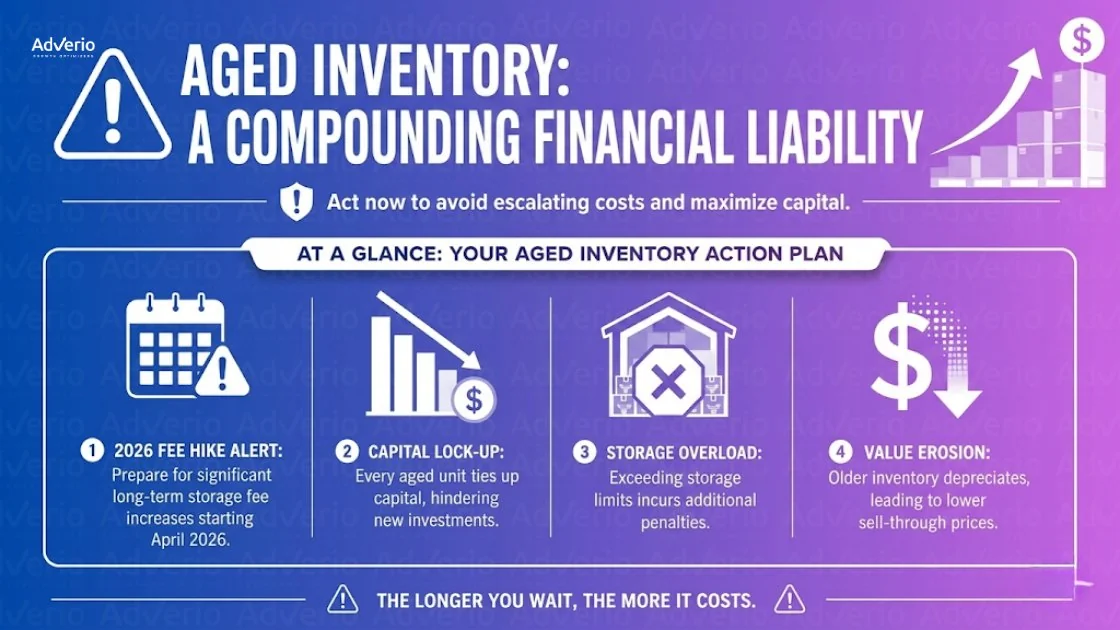
The wrong move is doing nothing because the SKU is “still selling a little.” Slow movement is how fee exposure compounds. You either accelerate sell-through before the threshold, or you accept that Amazon will charge you to warehouse your forecasting error.
Small note, big relief: no hard pitch, no obligation. Just a clear look at where profit is leaking.
What Amazon’s 2026 Aged Inventory Fee Structure Actually Costs You
Aged inventory is not a warehouse problem. It is a margin problem, a cash-flow problem, and a forecasting problem that gets more expensive every month you wait.
Amazon’s 2026 fee structure matters because it adds a direct surcharge once inventory ages past 180 days. By that point, the mistake already happened. The profit decision should start at 120 days, while you still have time to clear units on your terms instead of paying Amazon to hold them.
The fee table you should care about
| Days in FBA | Standard storage fee | Aged inventory surcharge | Total fee per cubic foot |
|---|---|---|---|
| 0 to 180 days | Standard rate applies | None | Standard rate only |
| 181 to 270 days | Standard rate applies | $0.50 per cubic foot | Standard rate plus $0.50 |
| 271 to 365 days | Standard rate applies | $5.45 per cubic foot | Standard rate plus $5.45 |
| 365+ days | Standard rate applies | $6.90 per cubic foot | Standard rate plus $6.90 |
If you need the full fee context beyond aged inventory, including fulfillment, referral, inbound placement, and return processing costs, that lives in the Amazon FBA fee breakdown guide. What this guide adds is the decision framework for what to do once you identify which SKUs are approaching the aged threshold.
What the fee actually does to your P&L
The surcharge is only the visible charge. The bigger hit comes from what that inventory blocks.
Every aged unit ties up cash that should be funding faster-turning SKUs. It also forces a later markdown, usually after you have already paid months of storage and surcharge costs. For bulky products, the drag gets worse fast because cubic footage drives the fee base.
That is why waiting for the 180-day threshold is weak operating discipline. The 120-day mark is the key action window. At 120 days, you still control the outcome. At 181 days, Amazon starts billing you for your delay.
Why operators underreact
Teams often review old inventory by unit velocity alone. That misses the financial picture.
A SKU can still sell and still be a bad asset to hold. If the unit is slow, bulky, margin-thin, or headed toward an inevitable discount, keeping it in FBA is usually the expensive choice. The right question is not, “Is it still moving?” The right question is, “What is my highest net recovery from this point?”
Use this lens:
-
Storage cost: ongoing monthly fees keep reducing contribution margin
-
Surcharge exposure: older inventory picks up extra cost once it crosses the aged threshold
-
Capital lock-up: cash stuck in stale units cannot be redeployed into inventory that turns faster
-
Recovery decay: delayed action often leads to a steeper markdown later
-
Exit cost: you may still end up paying for removal or liquidation after paying to hold it
This is stacked loss. You pay to store the unit, then pay again when you finally discount, liquidate, or remove it.
Hold stale inventory too long and margin leaks from four directions at once: fees, markdowns, trapped cash, and slower replenishment into products that actually turn. The broader margin context for why inventory inefficiency compounds across the full P&L lives in the Amazon profit margin guide. This framework focuses on the SKU-level clearance decisions once you know which units are at risk.
A simple worked example
Take a SKU that occupies 1 cubic foot and sits in the 181 to 270 day bucket for a month. You are paying the standard storage fee plus the aged inventory surcharge on that volume.
Now scale that across a few dozen slow ASINs, or one oversized product with deep stock. The issue stops being administrative and starts hitting operating profit. That is why mature brands do not treat aged inventory as cleanup. They treat it as a financial decision with a deadline.
What this should change in your operating model
Old inventory should be reviewed by net recovery versus future liability. That means making a hard call before the surcharge window, not after it.
Ask three questions:
-
What will this inventory cost if it stays in FBA for another 30, 60, and 90 days?
-
What cash can I recover now through discounting, bundling, liquidation, or removal?
-
Which option preserves the most contribution margin after fees and carrying cost?
If your team cannot answer those three questions quickly, the inventory is already managing your margin for you.
How to Identify Your Aged Inventory Risk Before the Threshold Hits
The critical decision point is 120 days, not 180. If you wait for the fee threshold to force action, you already gave up margin, cash, and optionality.
Your job here is simple. Find the SKUs that can still be saved, the SKUs that should be cleared, and the SKUs you must stop feeding with more inbound inventory.
Your starting point is the Inventory Age report in Seller Central. Pull it and rank exposure by dollars at risk, not by curiosity.
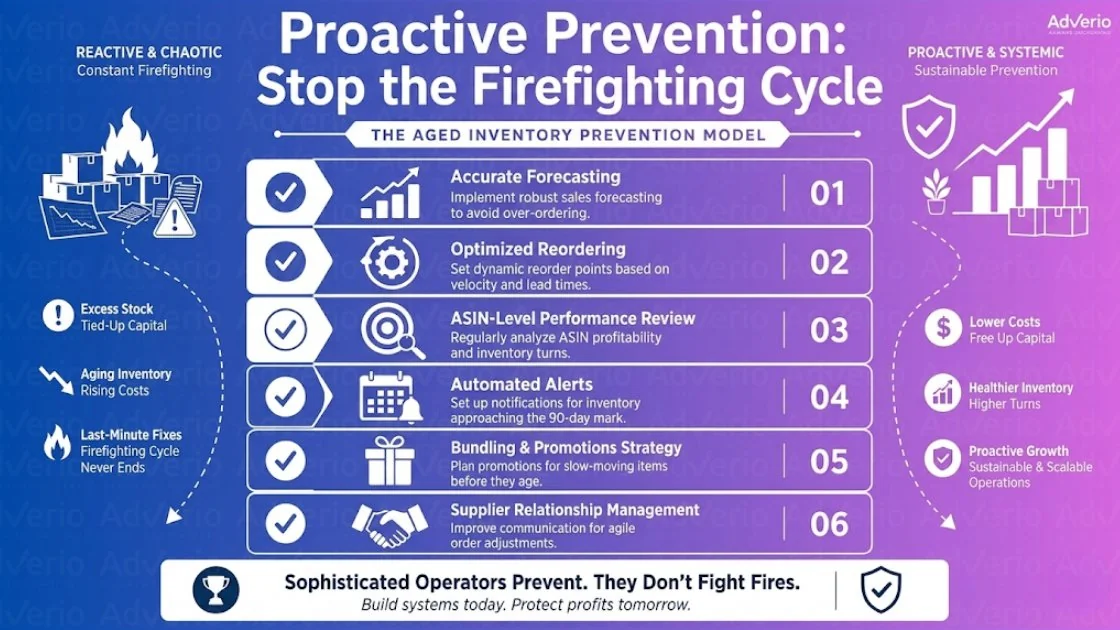
Pull the right report and filter it the right way
Use a clean operating rhythm:
-
Open Inventory Planning in Seller Central.
-
Export the Inventory Age report.
-
Filter for units aged over 120 days.
-
Sort by the largest inventory exposure first.
-
Review parent and child ASINs together when variation structure hides the actual problem.
This is the same discipline behind how to stay in stock on Amazon. Good inventory management is not just avoiding stockouts. It is also stopping excess units from sitting in FBA long enough to become a fee problem.
What to prioritize first
Start with financial exposure. Age alone is not enough.
Review these SKUs first:
-
High cubic-foot products: bulky inventory creates fee pressure fast.
-
High on-hand units with weak velocity: deep stock on a slow mover is a direct cash trap.
-
ASINs still receiving inbound units: bad replenishment can turn a manageable issue into a write-down.
-
Products with pricing pressure: if market price moved down, your recovery window is closing.
-
Listings with weak conversion: poor PDP performance kills sell-through and makes aging worse.
A SKU with 130-day inventory, soft conversion, and more units on the water deserves attention before a tiny low-volume SKU sitting at 170 days. Focus on dollar risk.
Build the business case before you act
Do not start with tactics. Start with the cost of waiting.
For each at-risk SKU, calculate three outcomes:
| Decision input | What to calculate | Why it matters |
|---|---|---|
| Hold | Storage and aged inventory fee exposure over the next 30, 60, and 90 days | Shows the real cost of delay |
| Discount | Net cash recovery from a price cut and faster sell-through | Shows whether you can clear profitably before fees rise |
| Remove or liquidate | Total recovery after removal, liquidation credits, and related costs | Sets the floor for any decision |
That comparison gives you a usable financial framework, the same SKU-economics view that should drive every hold-or-clear call. You are not asking whether the SKU can stay live. You are asking which option preserves the most cash and contribution margin from this point forward.
The mistake that keeps brands stuck
A common mistake is to overvalue keeping the SKU active and undervalue releasing cash for products that still turn.
If unit economics are broken, keeping the listing alive is not discipline. It is a profit leak.
A slow SKU has to earn its FBA space. If it cannot clear the hold scenario on a financial basis, stop protecting it and make the call.
The Clearance Decision Framework
At this point, operators usually get emotional. They don’t want to cut price. They don’t want to liquidate. They don’t want to admit the buy was too deep. None of that matters. The right move is the one that preserves the most value after fees.
Treat each option like a financial model.
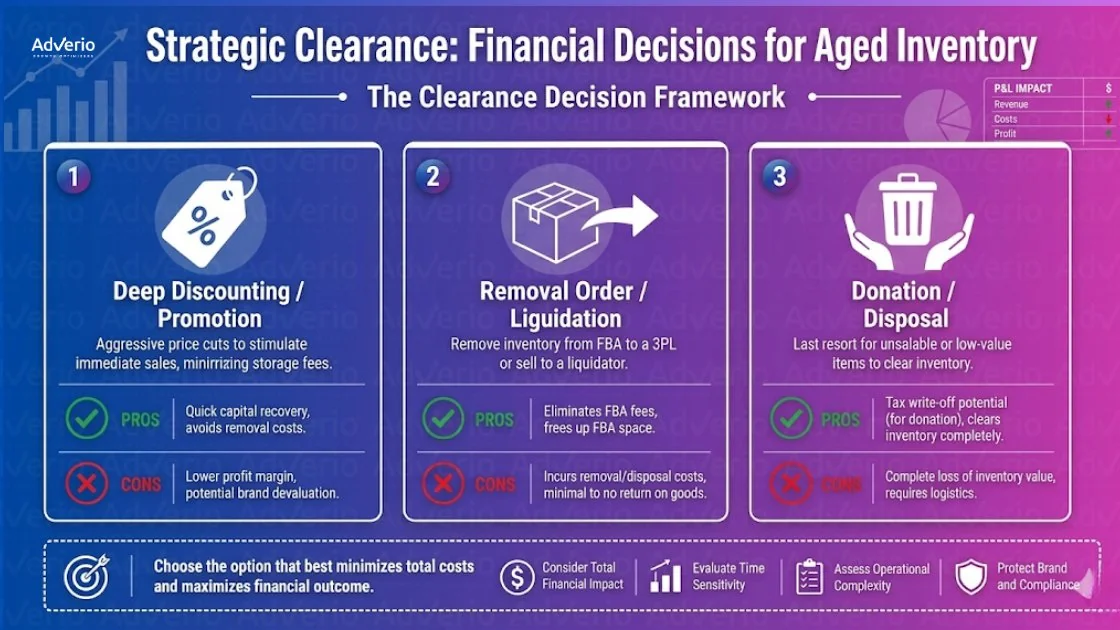
Option 1: Price reduction to accelerate sell-through
Start here when the SKU still has demand but the current price is blocking conversion. Your goal isn’t to protect list price. Your goal is to recover more than removal would.
Run this test:
-
Estimate your net proceeds at the reduced price
-
Compare that recovery against the cost of removing the inventory
-
Factor in near-term storage exposure if you delay
If reduced-price sell-through still recovers more cash than removal, discount it now.
Use Sponsored Products tactically to accelerate visibility during the markdown period. This is one place focused ad spend can earn its keep, if it helps you clear old units fast enough to avoid worse economics later. Keep the spend on terms with clear purchase intent and set a daily budget cap so clearance campaigns do not consume the margin you are trying to recover, and watch that this spend doesn’t quietly push up your TACoS. If you need a practical lens on promotion mechanics, review Adverio’s strategic deals breakdown.
Option 2: Amazon Outlet and liquidation programs
Use this when the ASIN still has some marketability, but not enough to justify standard selling posture. Outlet can help move stale inventory through Amazon’s promotional environment without building a custom rescue campaign from scratch.
The economics are straightforward. Margin gets worse, but storage pressure stops if units move. That’s the trade.
This route tends to make sense when:
-
The item still has consumer appeal
-
A standard price cut hasn’t created enough velocity
-
Removal gives you little to no meaningful recovery
-
You care more about cash recovery than brand presentation on that SKU
Don’t romanticize gross margin on aged stock. A lower-margin recovery can still be the highest-profit choice once future storage exposure is considered.
Aged inventory is not premium inventory. Price it and process it accordingly.
Option 3: Create a removal order before the fee threshold
If no realistic sell-through plan beats the economics of removal, remove it. Fast.
This option wins when the ASIN has one or more of these traits:
| Signal | What it usually means |
|---|---|
| Listing quality is weak and not worth rebuilding | Demand rescue will be expensive |
| Market price has compressed | Discounting won’t recover enough |
| The SKU is seasonal and the season is over | Waiting adds cost without demand |
| The unit is bulky | Storage pain compounds quickly |
The discipline here is simple. Compare removal cost against the next period of storage liability and likely markdown depth. If removal is cheaper than delay, the decision is done.
A lot of brands sabotage themselves by waiting for a “better time” to clear. That better time was earlier.
Option 4: Bundle with a faster-moving ASIN
Bundling is useful when the stale unit still has utility, but not enough standalone demand. Pair it with an ASIN shoppers already buy. That can improve sell-through without crushing perceived value.
This works best when the products are complementary. Think accessory plus core item, refill plus device, or add-on pack plus hero SKU. The wrong bundle creates friction. The right bundle raises perceived value and helps both units move.
Model the bundle on these questions:
-
Does the fast-moving ASIN carry enough demand to pull the slower unit through?
-
Does the bundle preserve acceptable unit economics?
-
Will the new offer convert better than a plain markdown?
Bundling is often cleaner than deep discounting because it reframes the offer instead of shouting clearance.
Which option should go first
Here’s the order I’d use:
-
Discount if demand exists and recovery beats removal
-
Outlet or liquidation if standard selling won’t clear fast enough
-
Removal if the economics are already broken
-
Bundle if the slow SKU has complementary value and the hero ASIN can carry it
That order isn’t ideological. It’s financial.
Aged inventory management is part pricing strategy, part catalog strategy, and part unit economics triage. If fee increases have already pressured your margin, pair these clearance decisions with a full rebuild of unit economics.
Your Amazon Aged Inventory Strategy: The Prevention Model
The critical aged inventory battle is won before a SKU hits 120 days. If you wait for the 180-day fee line, you are already protecting leftovers instead of protecting profit.
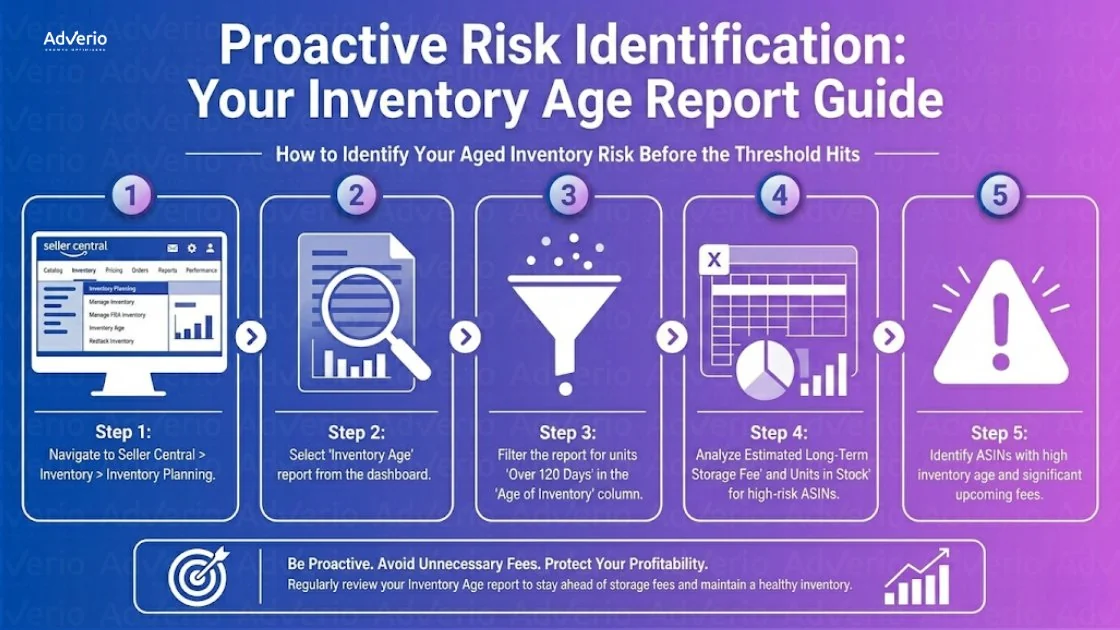
Prevention starts with one operating rule. Every SKU needs a 120-day review point tied to a financial decision, not a warehouse status check. At that mark, the question is simple: keep feeding this item, start controlled sell-through, or stop the bleed.
Reorder point discipline
Bad inventory usually starts with bad purchasing math. A SKU posts one strong stretch, the team inflates the next PO, and normal demand leaves months of excess sitting inside FBA.
Set reorder points from durable velocity, actual lead times, margin, and current conversion strength. Do not buy against peak-week emotion. Buy against base-rate demand.
Review each SKU at the unit-economics level. If sell-through is slowing, ad efficiency is weakening, or contribution margin no longer supports more inbound, cut the reorder before the aging problem gets expensive. For that margin lens, use Adverio’s FBA fee analysis as part of SKU triage.
Small forecasting errors become expensive fast. A little over-ordering at the PO stage turns into storage fees, price cuts, and weaker cash conversion later.
Seasonal forecasting
Seasonal buys need a liquidation path before the inventory is booked. If you cannot map a realistic sell-through window inside the season, do not send the units to FBA.
Forecast around the actual demand curve. Demand ramps, peaks, then drops. Operators who ignore the back half of that curve get trapped with inventory that missed its moment.
Use a tighter process:
-
forecast by season length and expected demand decay
-
taper inbound before the peak passes
-
set markdown triggers before inventory ages into a margin problem
-
cap end-of-season exposure at a level you can clear without wrecking the P&L
The mistake is not under-ordering. The mistake is shipping late-season optimism into a fee structure that punishes slow decisions.
New product launch inventory sizing
Launch inventory should buy data. It should not buy risk.
Keep the first shipment tight. Send enough units to validate conversion, review quality, traffic efficiency, and replenishment speed. If the SKU earns more inventory, reorder. If it stalls, you have limited the damage and preserved cash for products with real demand.
Brands create future aged inventory when they send months of stock before the listing has proven anything. Internal enthusiasm is not forecast accuracy. Market proof is.
The operators who stay out of aged inventory trouble do three things well. They control first buys, review every SKU before the 120-day mark, and force financial decisions early. That is how you stop aged inventory from turning into a recurring profit leak.
How Adverio Manages Aged Inventory for Clients
Aged inventory is a margin leak. We treat it like one.
For brands that work with Adverio on Amazon account management, we review inventory risk every week, with a clear focus on units approaching 120 days. That is the decision window that matters. Waiting for the 180-day fee event is how brands turn a controllable problem into a forced liquidation.
Our team uses operating cadences and internal systems, including Profit Pulse Intelligence System and AMOS, to surface at-risk SKUs, estimate the financial downside of holding, and assign a recovery path. The choice is made SKU by SKU. Mark down when the contribution margin still makes sense. Bundle when the attachment improves cash recovery without weakening the core ASIN. Remove or liquidate when carrying cost and fee exposure will outrun any realistic sell-through.
Speed matters here.
Clients do not need more dashboards. They need a weekly financial triage process that forces action before aged units consume ad budget, warehouse capacity, and margin. That is our Amazon aged inventory strategy in practice. Early, systematically, and with the P&L in view.
Frequently Asked Questions
Should I always remove inventory before it becomes aged?
No. Remove it when removal beats every other recovery path. If a controlled markdown or bundle can recover more cash than removal, take the recovery. If not, remove it and protect margin.
What’s the difference between Amazon Outlet and a normal sale?
A normal sale keeps the product in your standard retail posture. Outlet is a clearance-minded path designed to move inventory faster through discounted merchandising. If the SKU is stale, speed matters more than presentation.
Is it ever worth paying the aged inventory fee?
Yes, but only if you have a credible, near-term reason to believe the inventory will convert profitably and quickly enough to justify carrying it. Most brands use this as an excuse to delay. Delay is usually the expensive choice.
Can bundling rescue a weak SKU without hurting the stronger ASIN?
Yes, if the products are complementary and the bundle improves perceived value. No, if you’re forcing unrelated units together just to hide bad inventory. Bad bundles create a conversion problem on top of an inventory problem.
What’s the first report I should check every week?
Your Inventory Age report. Filter for anything over 120 days and review the SKUs with the largest exposure first. That’s where margin erosion starts showing up before finance feels it.
If your margin is shrinking while sales still look healthy, inventory age is one of the first places to look. Adverio helps established brands find those leaks across ads, listings, pricing, and inventory so profit decisions get made before Amazon makes them for you.